
Here are 8 ready-to-copy standard operating procedures examples you can adapt this afternoon, plus one master scaffold that works for any process you haven't documented yet. The list covers content publishing, hiring, sales onboarding, customer service escalation, inventory receiving, equipment maintenance, clinical/pharmacy dosing checks, and restaurant front-of-house service. Copy the one closest to your workflow, swap in your own scope and role names, then test it on someone who's never done the task before you call it finished.
Key Takeaways
An effective SOP names who does what, in what order, and gets validated by having someone unfamiliar with the task perform it before it's rolled out.
| Point | Details |
|---|---|
| Use the four core fields | Every SOP needs Purpose, Scope, Roles, and step-by-step Procedure at minimum. |
| Match format to task | Checklists suit repetitive low-skill work; flowcharts suit conditional, branching processes. |
| Test before rollout | Have someone who's never done the task try to complete it using only the document. |
| Set a real review date | Quarterly for high-risk processes, annually for stable ones, plus updates after any process change. |
| Keep the scaffold simple | Remove optional fields for straightforward tasks so frontline staff actually use the document. |
Table of Contents
- Standard Operating Procedures Examples You Can Copy Today
- Which SOP Format Fits Your Process?
- How to Write an SOP in 6 Steps
- The One SOP Template You Can Copy and Reuse
- How to Test and Keep an SOP Accurate
- Where to Store and Share Your SOPs
- What Actually Separates a Useful SOP From a Shelf Document
- Frequently Asked Questions
- Sources
Standard Operating Procedures Examples You Can Copy Today
Every mini-template below follows the same skeleton: Purpose, Scope, Roles, and step-by-step Procedure. That structure mirrors what Indeed's SOP guide recommends for teams that need to move fast without reinventing the format each time.
-
Content publishing SOP. Purpose: ship consistent blog or social content. Scope: covers drafting through publishing, excludes paid promotion. Roles: writer, editor, publisher. Steps: draft in the shared doc, submit for edit, apply SEO checklist, get final approval, schedule, confirm live link. Ask: could a new hire find the shared doc and publish without asking three questions?
-
Hiring/interview SOP. Purpose: standardize candidate evaluation. Scope: from resume screen to offer letter. Roles: hiring manager, interviewer panel, HR admin. Steps: screen resumes against a scorecard, schedule interviews, run structured questions, collect panel feedback, check references, extend offer. Ask: does every interviewer use the same scorecard?
-
Sales onboarding SOP. Purpose: get new sales hires productive fast. Scope: first 30 days only. Roles: sales manager, onboarding buddy, new hire. Steps: system access setup, product training modules, shadow three live calls, first solo call with review, 30-day check-in. Ask: is there a clear finish line for "onboarded"?
-
Customer service escalation SOP. Purpose: resolve complaints before they become refunds or reviews. Scope: covers tier 1 to tier 3 escalation. Roles: frontline agent, team lead, manager. Steps: log the complaint, attempt first-contact resolution, escalate if unresolved in 24 hours, manager reviews and responds, close ticket with follow-up. Ask: does every agent know the 24-hour trigger?
-
Inventory receiving SOP. Purpose: prevent stock discrepancies. Scope: covers delivery arrival through shelf placement. Roles: receiving clerk, warehouse supervisor. Steps: check delivery against purchase order, inspect for damage, log quantities in system, flag discrepancies, shelve and update inventory count. Ask: is the discrepancy-flagging step impossible to skip?
-
Equipment maintenance SOP. Purpose: reduce breakdowns and downtime. Scope: routine maintenance, not emergency repair. Roles: operator, maintenance technician. Steps: daily visual check, weekly lubrication/cleaning, monthly technician inspection, log all findings, schedule repairs before failure. Ask: are the intervals specific (weekly, not "regularly")?
-
Clinical/pharmacy dosing check SOP. Purpose: prevent dosing errors in a clinic or pharmacy setting. Scope: covers verification before dispensing, not prescribing. Roles: pharmacist, pharmacy technician. Steps: verify patient identity, cross-check dose against prescription, confirm no allergy conflicts, second-person verification for high-risk drugs, document and dispense. Ask: is the second-check step named, not assumed?
-
Restaurant front-of-house SOP. Purpose: consistent guest experience. Scope: covers greeting through table turnover. Roles: host, server, floor manager. Steps: greet within 60 seconds, seat and present menu, take order within 5 minutes, check back after first bites, process payment, reset table. Ask: would a first-shift server know every timing benchmark listed here?
Which SOP Format Fits Your Process?
Four formats cover almost every use case. Step-by-step narrative works for longer, less frequent processes where context matters, like onboarding. Short checklists suit repetitive, low-skill tasks like opening or closing a store, where speed beats explanation. Flowcharts or decision trees handle conditional processes, anything with "if this, then that" branches, like escalation paths. Hierarchical process maps suit complex, multi-department procedures where you need the big picture before the detail.
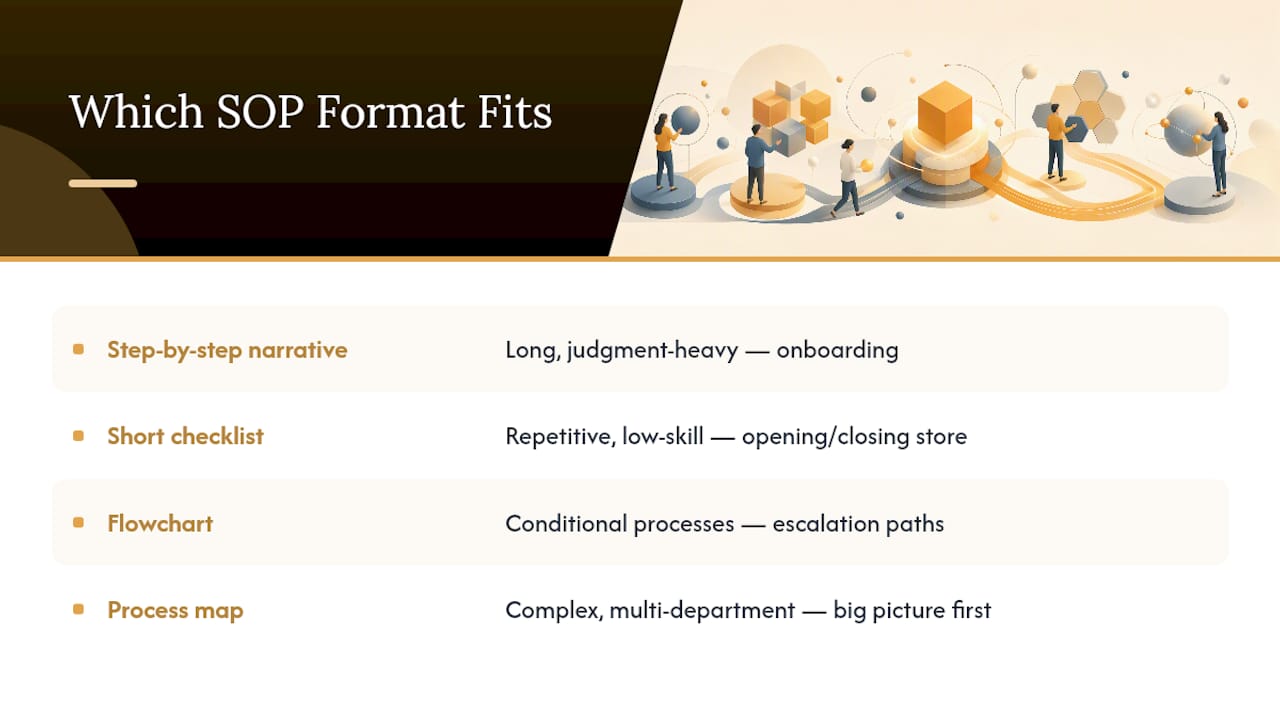
Match the format to the task, not your preference. Low-skill, high-repetition tasks get checklists. Branching logic gets flowcharts. Long, judgment-heavy work gets step-by-step narrative broken into subsections.
Pro Tip: Take any step-by-step SOP that's worked for six months and convert the procedure section into a one-page checklist for frontline staff. They'll actually use it during a shift instead of pulling up a five-page document.
How to Write an SOP in 6 Steps
Writing an effective SOP comes down to six steps: identify the process, draft it, assign roles, test it, implement it, and review it on a schedule.
- Identify the process. Pick a task that's repeated often or causes confusion when done inconsistently.
- Draft it. Write the steps in the order they actually happen, using the scaffold below, not from memory of how it's "supposed" to go.
- Assign roles. Name who does each step, not just "the team."
- Test it. Hand the draft to someone who has never performed the task.
- Implement it. Store it where the relevant team will actually see it, not buried in a shared drive nobody opens.
- Review it. Set a date to revisit, not an open-ended "we'll update it eventually."
Pro Tip: The real test isn't whether your team nods along when you explain the process. It's whether a brand-new hire can follow the written steps alone and get the same result. If they get stuck, the SOP is missing a step, not the employee lacking skill.
The One SOP Template You Can Copy and Reuse
This is the single scaffold to copy into a Word doc or Google Doc and reuse for every process in your business. A professional SOP document needs a handful of core fields, and nothing more, to work across almost any team.
- Title: Name the process exactly ("Weekly Payroll Submission," not "Payroll Stuff").
- Version: Track it as v1.0, v1.1, and so on.
- Purpose: One sentence on why this SOP exists.
- Scope: What's included and, just as important, what's excluded.
- Roles & responsibilities: Name the position, not the person.
- Procedure steps: Numbered, sequential, one action per step.
- Exceptions/notes: What to do when something doesn't fit the standard path.
- Associated forms/templates: Link any forms the procedure references.
- Review date/version control: When this gets checked again, and by whom.
A minimal, training-capable SOP should let a trained person perform the task without supervision, and double as the training document for the next hire.
Paste this scaffold into Word or Google Docs, format the headers as Heading 2, and export to PDF once it's finalized so the version you share can't be accidentally edited.
How to Test and Keep an SOP Accurate
The single best validation test costs nothing: explain the process to someone who's never done it and watch whether they can complete the task unaided. If they hesitate or improvise, the document has a gap, not the employee.

Review high-risk SOPs (safety, compliance, financial) quarterly. Stable, low-risk processes can go annually. Either way, SOPs are living documents that need updating whenever the underlying process or tooling changes, not just on a fixed calendar.
Pro Tip: Add a "last tested" date next to your review date. A document that hasn't been tested in a year is a guess, not a procedure.
Where to Store and Share Your SOPs
Keep a working copy in Google Docs or Word for editing, and export a locked PDF for reference once it's approved. Store SOPs in one shared drive folder per department, not scattered across inboxes, and set clear edit permissions so only owners can change the master copy. A simple master index listing every SOP, its owner, and its last review date solves most "where's the document" problems.

Pro Tip: Number every SOP file with its department and version (e.g., "OPS-04-v2") so old copies never get mistaken for current ones.
What Actually Separates a Useful SOP From a Shelf Document
Most SOP advice focuses on formatting: bullet points, headers, maybe a flowchart. That's not where most SOPs fail. They fail because nobody tests them against a real person before rolling them out, and nobody owns the review date afterward.
The Waybook framework gets this right: consistency comes from a simple, adaptable scaffold, not an exhaustive one. A ten-page SOP for a five-minute task gets skipped. A one-page checklist gets used. If you're building out documentation across a growing team, this is exactly the kind of systemization work that determines whether your business can run without you standing over every shift.
My honest read: businesses over-invest in writing SOPs and under-invest in testing them. Draft fast, test on a real newcomer within a week, and revise based on where they got stuck. That's the whole method, repeated for every process you want to survive you being on vacation.
Businesses considering hands-on help turning scattered processes into a working SOP library can look at Champion Business Coaching's coaching plans, built around a 90-day results guarantee for operational changes like this one. If you'd rather talk through your specific processes first, request a consultation and bring your messiest workflow to the conversation.
Frequently Asked Questions
What is an SOP and why does it matter for a small business? An SOP is a written procedure that spells out exactly how to complete a recurring task, step by step. It matters because it removes guesswork, lets you delegate confidently, and keeps quality consistent when someone new joins or covers a shift.
How long should a standard operating procedure be? As short as the task allows. A checklist task might need half a page; a multi-department process might need several pages with subsections. Length should match complexity, not company convention.
What's the difference between a policy and an SOP? A policy states a rule or principle (what should happen). An SOP describes the exact steps to make that rule happen in practice (how it gets done).
How often should SOPs be reviewed and updated? Quarterly for high-risk or compliance-related procedures, annually for stable low-risk ones, and immediately after any change to the process, tools, or regulations involved.
Do I need special software to create SOP templates? No. Word or Google Docs handles drafting and editing fine, and exporting to PDF locks the final version for sharing. Dedicated knowledge-base tools help once you're managing dozens of SOPs across teams.
Sources
"A simple, adaptable scaffold beats an exhaustive one." Start with Waybook's SOP templates or the University of Alabama's SOP template for a regulatory-grade format.
- SOP template | OPS
- Example standard operating procedure (SOP) template | Doncaster and Bassetlaw Teaching Hospitals NHS Foundation Trust
- SOP templates & examples (PDF, Docs, Sheets) | Waybook