
Process mapping is a visual blueprint of how work actually flows from the moment a task starts to the moment it's done, including every decision and handoff along the way. The fastest way to see the value is to stop reading and map one high-impact process this week. Pick something that happens often and touches customers directly, like your invoice approval or client onboarding, and sketch it on a whiteboard with your team.
Do that and you'll typically see:
- Where work stalls waiting on one person or one approval
- Steps that exist out of habit rather than necessity
- Exactly where a new hire or an automation tool could take over
Key Takeaways
Process mapping turns invisible workflow habits into a visible diagram that reveals bottlenecks, clarifies ownership, and prepares a business for automation.
| Point | Details |
|---|---|
| Start small | Map one high-impact, frequent process this week instead of trying to map the whole business. |
| Match the map to the goal | Use SIPOC for training, flowcharts for single teams, swimlanes for cross-department handoffs. |
| Map reality, not the ideal | Interview the person who does the work to capture actual workarounds, not the official version. |
| Keep it to five shapes | Full BPMN notation reduces team adoption; simple shapes keep the map usable. |
| Assign an owner and review date | A map without an owner and a review cycle goes stale within months. |
| Get facilitation support | Championbusinesscoaching runs mapping workshops and embeds KPIs under a 90-day results guarantee. |
Table of Contents
- What Is Process Mapping for a Small Business, Really?
- Why Process Mapping Helps Small Businesses Run Smoother
- Which Type of Process Map Should You Use?
- How Do You Run a Process Mapping Workshop?
- Which Process Should You Map First?
- What Tools and Templates Can You Use Today?
- How Do You Measure Whether the Map Actually Worked?
- What Are the Most Common Process Mapping Mistakes?
- Running Your First Workshop: A One-Page Template
- What I've Learned Running These Workshops With Owners
- Get Help Turning Your Map Into a Working System
- Where to Learn More About Process Mapping
- Frequently Asked Questions
- Sources
What Is Process Mapping for a Small Business, Really?
A process map is a visual diagram: boxes, arrows, and decision points showing who does what, in what order, and where the work hands off between people. It differs from written process documentation, which spells out procedures in paragraphs or numbered steps without showing the flow visually. Use a map when you need to spot bottlenecks or train someone fast. Use written documentation when you need detailed instructions for a single step, like exact software settings.
Take invoice approval. A map shows the invoice moving from bookkeeper to manager to payment, with a decision diamond asking "over $500?" A written SOP would spell out which fields to check before approving. Client onboarding works the same way. The map shows the sequence from signed contract to first delivery; the documentation covers how to fill out each form.
Why Process Mapping Helps Small Businesses Run Smoother
Mapping forces you to document every step and decision before you change anything, and that alone exposes handoffs and bottlenecks that were invisible when the process just lived in someone's head.
The practical payoffs show up fast:
- New hires get productive in days instead of weeks because the workflow is visible, not tribal knowledge
- Errors drop when handoffs and decision points are explicit instead of assumed
- Automation becomes realistic once the steps and rules are written down instead of guessed at
One service business we've seen cut invoice processing from five days to two just by mapping the approval chain and removing a redundant sign-off step nobody could explain. The owner benefits from visibility, frontline staff get clearer handoffs, and new hires ramp up faster because they're not relying on someone else's memory.
Which Type of Process Map Should You Use?
Not every process needs the same level of detail, and picking the map type should depend on who's using it and why, not on which shapes look impressive.
- SIPOC (Suppliers, Inputs, Process, Outputs, Customers): a high-level overview, useful for training and getting leadership alignment fast.
- Flowchart: the standard start-to-finish sequence with decision points, good for most single-department workflows.
- Swimlane (cross-functional): separates the flow by role or department, essential when a process crosses more than one team, like sales handing a deal to fulfillment.
- Value stream map: tracks time and waste at each step, built for spotting delays in a process that already has volume.
- Detailed / Level 4: documents every field, click, and exception, mainly useful right before automation or compliance audits.
- BPMN (Business Process Model and Notation): formal notation with standardized symbols, mostly relevant if you're feeding the map into workflow software.
Most small businesses live in the Level 2 to Level 3 range: enough detail to be useful for training and improvement, not so much that nobody wants to update it.
How Do You Run a Process Mapping Workshop?
You don't need software or a certification to build a map your team will actually use. You need the right people in a room and a method that keeps things honest.
- Scope it first. Define the exact trigger (a customer inquiry lands) and the exact end point (invoice paid, or job closed). A process without clear boundaries sprawls fast.
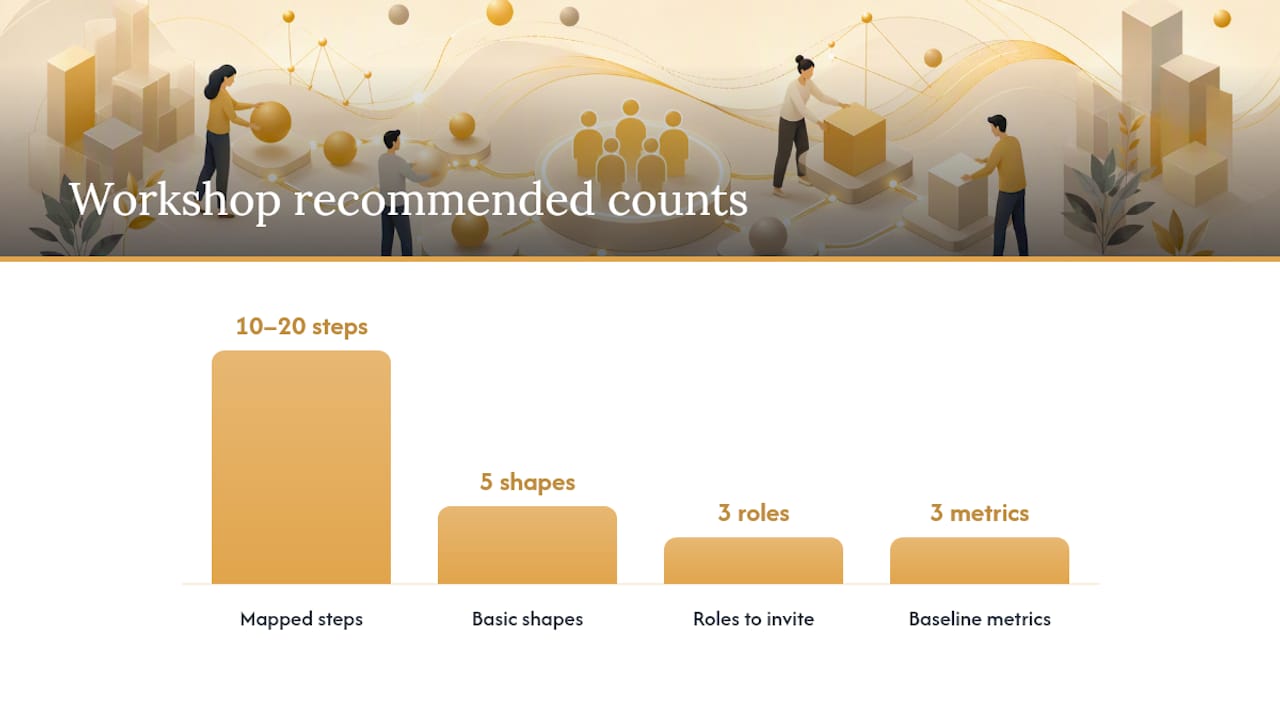
- Invite the right people. Bring the person who owns the process, the people who actually perform it day to day, and one internal stakeholder downstream who receives the output. Skip the temptation to only invite managers.
- Map the current state, not the ideal one. Ask "what actually happens" rather than "what's supposed to happen." Interviewing the person who executes the process surfaces workarounds nobody wrote down.
- Draft on a whiteboard or sticky notes first. Digitizing too early kills momentum. Get the sequence right on paper before anyone opens a laptop.
- Validate the draft. Walk it past someone who wasn't in the room. Ask: does this match what happened the last three times? Where do exceptions occur? Who gets skipped when someone's on leave?
- Design the future state. Once the current map is accurate, mark the pain points and redesign only those steps.
- Pilot the change on a small batch of real transactions before rolling it out everywhere.
- Measure before and after. Time the old process for a week; time the new one for a week; compare.
Before you touch anything, capture a baseline: how long the process takes end to end, how many errors or rework loops happen per month, and how many people touch it. Without that baseline, you can't prove the map made a difference.
Pro Tip: Cap your map at five basic shapes: start/end, action, decision, input/output, and document. Small-business teams that try to use full BPMN notation from day one usually abandon the map within a month because it's exhausting to update.
A workshop like this can realistically map a 10 to 20 step process in a couple of hours, including interviews and validation.
Which Process Should You Map First?
Not every workflow deserves the same attention right away. Rank candidates against a short checklist:
- How often does it run? Weekly beats quarterly for fast learning.
- Does it touch customers directly?
- Does it depend on one person who'd cause chaos if they left?
- Is it a frequent source of errors, rework, or cost?
- Is there a compliance or safety requirement attached?
Processes with the biggest revenue or customer impact usually deliver the most leverage for the least effort. Good starting candidates: lead to quote to invoice, new client onboarding, and stock reorder points. Size the project to your team's capacity. One process, one workshop, one week is plenty for a first attempt.
What Tools and Templates Can You Use Today?
You don't need to buy anything to start. A whiteboard and sticky notes work fine for a first draft. Once you're ready to digitize, several tools cover different needs:
- Asana: best for linking mapped steps directly to assignable tasks and deadlines.
- Microsoft Visio: suited to formal, detailed diagrams if your business already lives in the Microsoft ecosystem.
- Miro: strong for collaborative, real-time mapping with AI-assisted drafting, useful when your team works remotely.
- Lucidchart: offers ready-made templates and BPMN 2.0 shape support for teams that need formal notation later.
- monday.com: good once you want to turn a static map into a live, tracked workflow rather than a picture.
- Creately: built around guided templates for flowcharts, swimlanes, and SIPOC diagrams if you want structure without a blank canvas.
Across these tools, the comparison points that matter are ease of use versus formal BPMN support, template availability, real-time collaboration, whether a free tier exists, integrations with task platforms, and how easily you can export to PDF or image for training material. If your team is under five people, a spreadsheet or sticky notes are genuinely enough until the process stabilizes.
How Do You Measure Whether the Map Actually Worked?
Pick a small set of numbers and track them before and after the change:
- Cycle time: how long the process takes start to finish
- Error or defect rate: how often rework is needed
- Handoff wait time: how long work sits between steps
- Throughput: how many units move through per week
- First-time-right rate: how often it's done correctly without correction
- Customer satisfaction: relevant for customer-facing processes like onboarding
Collect the baseline through simple time studies, sampling a handful of transactions, or exporting logs from whatever system you already use. Write the target KPI directly onto the map and assign one owner responsible for watching it.
What Are the Most Common Process Mapping Mistakes?
Most maps fail for predictable, avoidable reasons:
- Mapping the ideal, not reality → Interview the actual performer and ask what really happens, including workarounds.
- Over-detailing every micro-step → Stick to the five-shape method and add detail only where it changes a decision.
- No owner assigned → Every map needs one named person accountable for keeping it current.
- No review cycle → Set a recurring date, quarterly is reasonable, to check the map still matches reality.
- Mapping everything at once → One process, fully validated, beats five processes half-drawn.
Governance doesn't need to be heavy. One owner, one sign-off step, one shared folder as the single source of truth is enough for most small teams. Once a map is stable and used often, that's the signal to move it into an executable workflow platform rather than leaving it as a static diagram.
Running Your First Workshop: A One-Page Template
Block 60 to 90 minutes and follow this flow: introduce the goal (5 minutes), walk through the current process step by step (20 minutes), draft the map together on a whiteboard (25 minutes), mark pain points with a different color sticky note (10 minutes), brainstorm quick fixes (15 minutes), assign owners to each action (10 minutes).
- State the process name, trigger, and completion point before anyone touches a marker.
- Walk the sequence out loud, person by person.
- Draft the map live, don't pre-draw it.
- Flag pain points as you go.
- Assign one owner per fix before the room breaks up.
Your one-page template should capture: process name, trigger, completion event, process owner, a steps column noting who does it, what tool they use, and how long it takes, a pain points column, and a next-actions column.
Pro Tip: Ask "what happens when this person is on leave?" during the walk-through. It's the single fastest way to surface hidden single points of failure.
What I've Learned Running These Workshops With Owners
Every workshop I've watched follows the same pattern: the room gets quiet the moment someone admits the process doesn't actually work the way the org chart says it does. That honesty is where the value lives, not in the finished diagram.
The businesses that stick with mapping treat it as a living habit, not a one-off project.
Get Help Turning Your Map Into a Working System
A process map on a whiteboard is a good start. The gap most owners hit is turning that map into a system that runs without them chasing it every week, and that's where a structured business coaching engagement earns its place. Championbusinesscoaching facilitates the mapping workshop with you, helps embed the right KPIs directly into the map, and works with you to convert static diagrams into workflows your team actually maintains.
Coaching slots are deliberately limited to keep the work hands-on, and every engagement runs under a 90-day guarantee: real results, or your coaching session is free. If you want a facilitator in the room for your first mapping session, book a consultation and get a workshop on the calendar.
Where to Learn More About Process Mapping
- Microsoft's guide to process mapping for a broad overview of why mapping matters operationally.
- monday.com's six-step build guide for turning a map into a tracked workflow.
- Lucidchart's process mapping software page for BPMN templates and formal diagram options.
- Miro's process mapping tool for real-time collaborative and AI-assisted mapping.
- Creately's process mapping guide for template types across flowcharts, swimlanes, and SIPOC.
- HubSpot's free process map template for a quick-start spreadsheet-based option.
- Trailhead's business process mapping module for validation and interview techniques.
Frequently Asked Questions
What's the difference between a process map and a flowchart? A flowchart is one specific type of process map. Process mapping is the broader practice; a flowchart is a common format showing sequential steps and decisions within it.
How long does it take to map a process for the first time? A typical 10 to 20 step process usually takes a couple of hours including interviews, drafting, and validation, based on Mapaflow's field guidance. More complex or compliance-heavy processes take longer.
Do I need software to create a process map? No. A whiteboard, sticky notes, or a free spreadsheet template handle a first draft fine. Move to dedicated tools like Lucidchart or Miro once you need to share, version, or collaborate remotely on the map.
Who should be in the room during a mapping workshop? Include the process owner, the people who actually perform the work, and at least one person downstream who receives the output. Leaving out the frontline performer is the most common reason maps end up describing the wrong process.
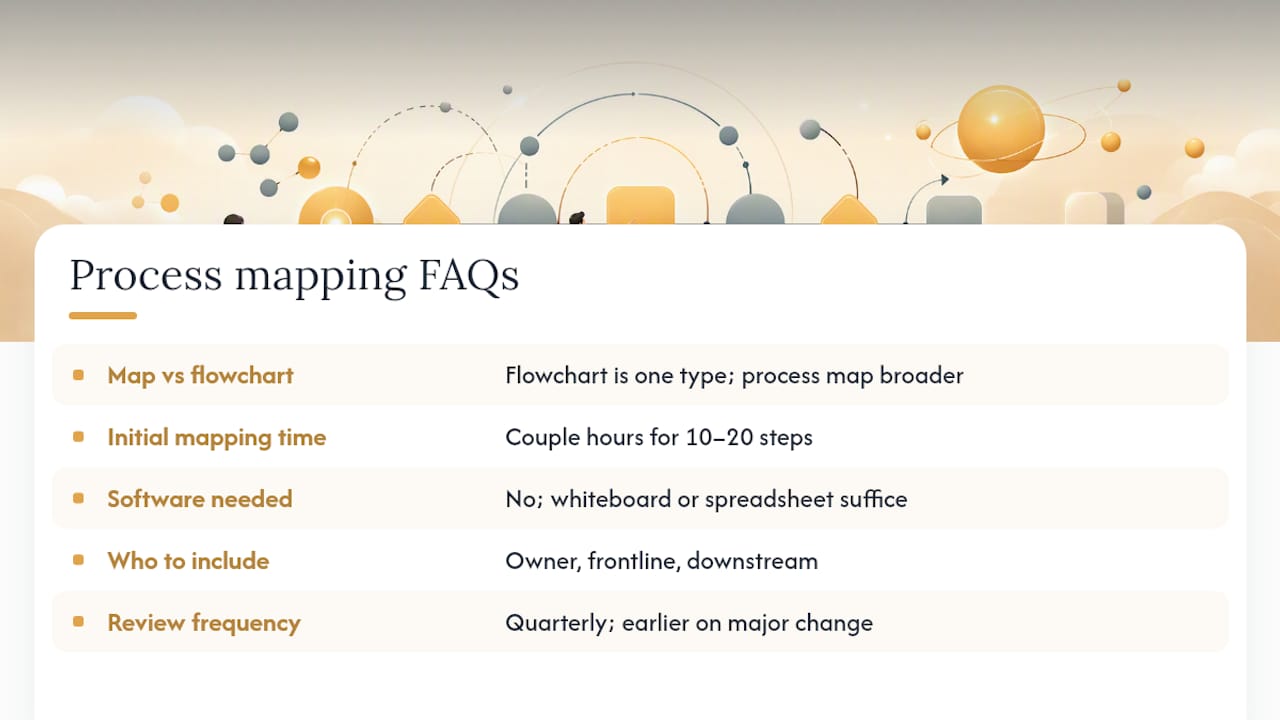
How often should a process map be reviewed? Quarterly is reasonable for most small-business workflows. Review sooner if the process changes staff, tools, or volume significantly.
Sources
- Creating a process map: How-tos, templates, and tips (Creately)
- How process mapping will help your business succeed
- Business process mapping software (Lucidchart)
- A process mapping tool that brings clarity to complex work (Miro)