
For most Australian tradies, the fastest path to less admin and better margins is picking one purpose-built app and mandating field use from day one. Start there, not with a feature checklist.
Here are the five platforms worth your attention:
- Tradify — Purpose-built for electricians, plumbers, and HVAC techs. Free one-on-one training and phone support make it the easiest entry point for a crew of 1–5.
- NextMinute — Built for residential builders running multi-stage projects. Sydney-based support team and a pricing model that starts at AU$199/month for 3 users, scaling up as your team grows.
- ServiceM8 — iOS-first, fast quoting, and built for high-volume service contractors. Businesses using ServiceM8 reported roughly a 30% increase in work completed within three months of going live.
- Fergus — All-in-one with supplier price-book integrations and no job-credit pricing. Trusted by many tradies across Australia and New Zealand.
- Buildxact — Estimating-first platform for small builders who need progress-claim workflows and detailed cost control.
For a 1–5 person crew: start with Tradify or ServiceM8. Both offer free trials and get you operational within days. For a growing builder: NextMinute or Buildxact will handle multi-stage project complexity better. All five platforms offer a free trial period, so you can test end-to-end before committing.
Table of Contents
- Which job management software should you try first?
- Core features every tradie needs from enquiry to invoice
- How much does job management software cost in Australia?
- Australian compliance and accounting integrations to check
- How to choose the right system — questions, red flags, and onboarding
- Real-world adoption tips and what to expect in the first 90 days
- Key Takeaways
- Why the feature list is the wrong place to start
- Championbusinesscoaching gets Australian tradies live faster
- Sources and further reading
Which job management software should you try first?
| Platform | Best for | Key features | Integrations | Pricing & trial | Local support | Mobile/offline | Reporting |
|---|---|---|---|---|---|---|---|
| Tradify | Small tradie crews (1–5) | Quoting, scheduling, timesheets, invoicing, trade templates | Xero, MYOB, Stripe | Per-user; free trial | Phone support + free 1:1 training | iOS & Android, offline capable | Job profitability, time tracking |
| NextMinute | Residential builders, 3+ users | Multi-stage job tracking, variations, progress claims, scheduling | Xero, MYOB | AU$199/mo for 3 users; free trial | Sydney-based team | iOS & Android | Project cost reporting |
| ServiceM8 | iOS-focused service contractors | Fast quoting, on-site invoicing, scheduling, client comms | Xero, MYOB, payment gateways | Per-active-job pricing; free trial | Online support | iOS-optimized, offline | Job volume, revenue tracking |
| Fergus | Tradies needing supplier integrations | Job tracking, supplier price books, timesheets, invoicing | Xero, MYOB, payment gateways | Per-user; free trial | Phone + live chat + onboarding | iOS & Android | Profitability, supplier costs |
| Buildxact | Small builders, estimating-heavy | Estimating, progress claims, scheduling, cost control | Xero, MYOB | Per-site pricing; free trial | Onboarding support | iOS & Android | Estimate vs. actual reporting |
Quick picks by situation:
- Small crew (1–5 people): — Tradify for its templates and training; ServiceM8 if your team runs iPhones and does high-volume service calls.
- Project builder: — NextMinute or Buildxact for multi-stage tracking and progress claims.
- Supplier-heavy tradie business: — Fergus, specifically for its price-book integrations and scalable job tracking.
Integrations callout: Every platform above connects to Xero and MYOB, which matters for BAS-ready invoicing and payroll. Confirm payment gateway support (Stripe, PayPal, or direct bank) with each vendor before signing up, since gateway fees vary.
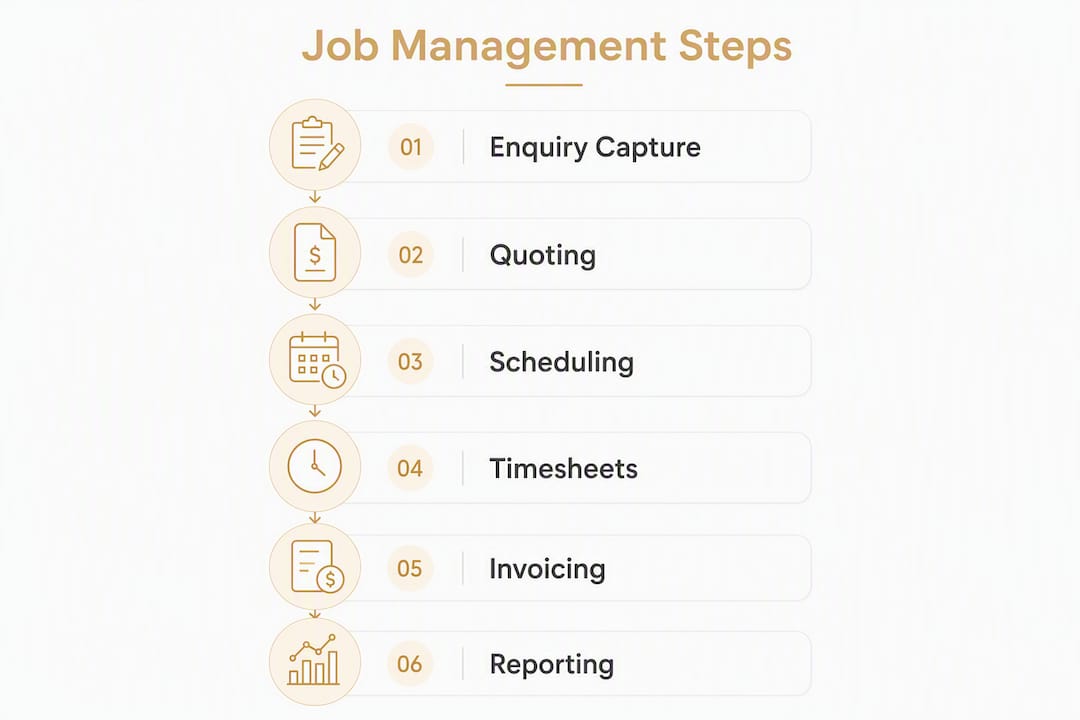
Core features every tradie needs from enquiry to invoice
The best tradie job management software follows a job through every stage. Here is what each step requires and where gaps cost you money.
Lead and enquiry capture: You need a single inbox for calls, emails, and web forms. Missed enquiries are missed revenue. Tradify and Fergus both funnel enquiries directly into the job pipeline.
Quoting and estimating: Mobile quoting matters most here. A tech who can quote on-site and send it before leaving the driveway closes more work. Buildxact goes further with supplier price books baked into estimates, which protects margins when material costs shift.
Scheduling and rostering: Drag-and-drop scheduling with real-time visibility across your crew. ServiceM8 handles high-frequency scheduling well; NextMinute is built for multi-week project timelines.

Timesheets and cost capture: Every hour logged in the field is a data point for job profitability. If your team is still texting hours at end of day, you are flying blind on margins.
Site diaries and photos: Mobile apps with offline capture let techs record site conditions, photos, and notes without connectivity. This protects you in disputes and speeds up variation approvals.
Variations and change orders: Untracked variations are where profit disappears. A good system prompts the tech to log a variation before doing the extra work, not after.
Invoicing and payments: Invoice from the job card the moment work is complete. The faster you invoice, the faster you get paid. ServiceM8 is particularly strong here for on-site invoicing.

Reporting and job profitability: At minimum, you need a report that shows budgeted vs. actual cost per job. Without it, you cannot tell which job types make money and which drain it.
Pro Tip: Mandate mobile app use for every technician from day one. Site photos, diaries, and real-time timesheets captured in the field protect your margins and cut end-of-week admin by hours. The software cannot help you if your team is still using paper.
How much does job management software cost in Australia?
Pricing shapes vary across the market, and the sticker price rarely tells the full story.
Common pricing models:
- Per-user/month (Tradify, Fergus): Predictable but scales up fast as your team grows. Budget for 1→5→10+ users before you commit.
- Per-active-job (ServiceM8): Cost-effective for lower job volumes; can spike in busy periods.
- Per-site/month (Buildxact): Fixed cost per project site, which suits builders running a defined number of active sites.
- Tiered flat plans (NextMinute): AU$199/month for 3 users, scaling with team size.
Hidden costs to watch for: setup fees, data migration charges, add-on modules (SWMS forms, payroll connectors), contractor seat definitions, and payment gateway transaction fees.
| Platform | Pricing model | Free trial | Starter tier typically includes | Usually excluded |
|---|---|---|---|---|
| Tradify | Per user/month | Yes | Quoting, scheduling, invoicing, Xero/MYOB | Advanced reporting on lower tiers |
| NextMinute | Tiered flat (AU$199/mo for 3 users) | Yes | Multi-stage jobs, variations, local support | Confirm add-ons with vendor |
| ServiceM8 | Per active job | Yes | Quoting, invoicing, scheduling, iOS app | Some integrations on lower tiers |
| Fergus | Per user/month | Yes | Job tracking, supplier integrations, onboarding | Confirm seat limits with vendor |
| Buildxact | Per site/month | Yes | Estimating, progress claims, scheduling | Confirm payroll connector with vendor |
Your 14-day trial checklist:
- Create a real live job from enquiry through to invoice.
- Send a quote and convert it to an invoice.
- Run a job profitability report.
- Test the mobile app offline (turn off WiFi and capture a site diary).
- Connect your Xero or MYOB account and check chart-of-accounts mapping.
- Call or chat with support and time the response.
Total cost of ownership note: Add setup time (or a setup partner fee), data migration, staff training, and the monthly subscription across 12 months. For a 5-person crew, annual all-in costs typically run from a few thousand dollars upward depending on the platform and add-ons. Plan budget scenarios before you sign.
Australian compliance and accounting integrations to check
Australian trades face compliance requirements that generic project management software simply does not handle. Getting this wrong creates more admin, not less.
Critical integrations to verify before signing:
- Xero and MYOB: Chart-of-accounts sync, GST-inclusive invoice mapping, and BAS-friendly reporting. Every platform in this list claims compatibility; test it during your trial with your actual accountant.
- Payment gateways: Stripe, PayPal, and direct bank transfer support vary by platform. Confirm transaction fees.
- Supplier price books: Fergus and Buildxact both offer supplier integrations that pull live pricing into quotes, which protects margins.
- Payroll connectors: Confirm whether the platform connects to your payroll tool or whether you need a separate integration.
Australian compliance features to ask about:
- Progress claim support (especially for Queensland's BCIPA and similar state legislation)
- SWMS and JSA digital form generation and storage
- Certificate of completion workflows
- State-specific contract templates
Build Paperless explicitly builds state-by-state support and AI-powered estimation into its platform, which shows the direction the market is heading. When evaluating any vendor, ask directly: "Do you have setup examples for my state?"
| Compliance feature | Why it matters | Which vendors address it |
|---|---|---|
| Progress claims | Statutory requirement in most states for construction | NextMinute, Buildxact, Build Paperless |
| SWMS/JSA digital forms | WHS obligation; paper forms create liability gaps | Confirm with each vendor |
| GST-inclusive invoicing | BAS accuracy | All five platforms |
| State-specific templates | Avoids non-compliant contracts | Ask vendor directly |
Integration test with your accountant: During your trial, ask your accountant to review one synced invoice. Check that GST codes map correctly, that job categories hit the right accounts, and that the BAS data looks clean. Fixing this after go-live is painful.
How to choose the right system — questions, red flags, and onboarding
A good vendor demo answers more than feature questions. Use this checklist on every call.
Questions to ask every vendor:
- What does onboarding include, and is there a local setup partner in my state?
- Who handles data migration from my current system (spreadsheets, MYOB, etc.)?
- How are user seats defined? Does a subcontractor count as a seat?
- What is the response time for phone or live chat support?
- Which reports show job profitability, and can I filter by job type or technician?
- What happens to my data if I cancel?
Red flags to walk away from:
- Pricing is not published and the sales rep won't give a written quote.
- "Unlimited users" turns out to have a fair-use cap buried in the terms.
- No local support or Australian references you can call.
- No Xero or MYOB integration, or it requires a third-party connector you pay for separately.
- The mobile app requires constant connectivity (no offline mode).
- Core features like SWMS forms or progress claims are locked behind a higher-priced tier.
Onboarding expectations: Self-setup with good documentation takes days to a couple of weeks. Partner-assisted onboarding with supplier price-book imports and trade-specific template configuration can cut that to days. Good onboarding includes pre-loaded trade templates, a connected accounting file, and at least one live job created with a real tech before go-live.
For deeper vendor-selection frameworks, the workshop management software guide from MDMS covers field-service evaluation criteria worth reading alongside your vendor demos.
Real-world adoption tips and what to expect in the first 90 days
The software is not the hard part. Getting your team to use it consistently is.
Businesses using ServiceM8 reported roughly a 30% increase in work completed within three months of implementation, driven by tighter scheduling and faster invoicing. That kind of gain is real, but it requires the owner to enforce field use from day one.
Adoption tips that actually work:
- Map your current job workflow on paper before you configure anything. Know your steps before you digitize them.
- Involve your suppliers early. If your platform supports price-book imports, get that done in week one.
- Set 30/60/90-day KPIs: jobs invoiced within 24 hours of completion, timesheet compliance rate, and average days-to-payment.
- Measure time-to-value weekly in the first month. If adoption is stalling, the problem is usually one person not using the app.
The biggest adoption hurdle is cultural. The owner must mandate app use for every technician. Leaving it optional guarantees partial data, which means partial visibility into margins.
A business systemisation approach pairs well with software rollout: document the process, train to the process, then measure against it. Coaches who specialize in trades businesses can shorten this cycle significantly by enforcing accountability structures that software alone cannot provide.
Realistic 90-day outcomes when adoption is enforced: reduced end-of-week admin, invoices sent same day as job completion, clearer job profitability by type, and improved cash flow from faster payment cycles. The operational efficiency gains compound once the data is clean.
Key Takeaways
The right job management software for Australian tradies combines local compliance support, Xero or MYOB integration, and enforced mobile field use from day one.
| Point | Details |
|---|---|
| Pick one and trial it properly | Run the 6-step trial checklist across a real live job before committing to any platform. |
| Adoption is the hard part | Mandate mobile app use for every technician; partial use produces partial data and no margin clarity. |
| Hidden costs add up fast | Budget for setup, data migration, training, and seat-cost increases from 1 to 5 to 10+ users. |
| Compliance features vary by state | Ask vendors directly about progress claims, SWMS forms, and state-specific templates before signing. |
| Championbusinesscoaching accelerates adoption | Tradie-specific coaching programs help owners enforce field use, set 30/60/90 KPIs, and reach profitability gains faster. |
Why the feature list is the wrong place to start
Most tradie business owners spend weeks comparing feature lists and pricing tiers, then go live and find half the team still texting job updates at 5 PM. The software did not fail. The rollout did.
Every platform in this article has the core features you need: quoting, scheduling, timesheets, invoicing, and Xero integration. The differences between them are real but narrower than the marketing suggests. What actually separates a business that gains 30% more throughput from one that gets a fancy filing cabinet is whether the owner treats go-live as a cultural change, not a software installation.
The businesses that get the fastest return do three things: they map their workflow before they configure anything, they set non-negotiable rules about field app use, and they measure outcomes weekly for the first 90 days. None of that is in the software manual.
Chasing the "perfect" platform while delaying go-live is its own cost. Pick the best fit from this shortlist, run the trial properly, and start measuring. The data you collect in month one will tell you more than any comparison table.
Championbusinesscoaching gets Australian tradies live faster
Software selection is the easy part. Getting your crew to use it, connecting it to your accounting file, and measuring the right KPIs in the first 90 days is where most tradie businesses stall. Championbusinesscoaching's tradie-specific coaching program is built for exactly this: hands-on setup support, workflow mapping, and enforced adoption accountability so you hit profitability gains in months, not years.
The 90-day coaching guarantee means results or your session is free. Five-star Google rating. Limited coaching slots to keep quality high. If you are ready to go live with job management software and want a coach who has done it with trades businesses before, book a free consult and get a clear action plan within the week.
Sources and further reading
Primary sources used in this article:
- Tradify: Job Management Software for Tradies
- NextMinute: Job Management Software for Builders & Tradies
- ServiceM8: Smart Job Management Software
- Fergus: Job Management Software Trusted by 20,000 Tradies
- Build Paperless: Job Management Software for Builders & Trades in Australia
- MDMS: Workshop Management Software Australia Guide
- MDMS: Offline Field Service App Features
Championbusinesscoaching resources for adoption and systemisation:
- Business Systemisation for Australian SMEs
- How to Achieve Operational Efficiency in Australia
- Tradie Business Coaching Program
- Business Coaching Australia