
A field service workflow is the fixed sequence a job travels through, from the moment a customer request lands to the moment the invoice clears. The next action for any operations leader reading this: pick one recurring job type and map its current path, step by step, before touching any software.
Every workflow, no matter the industry, breaks into three moving parts:
- Prework — intake, scheduling, and dispatch
- Execution — the on-site visit itself
- Close — reporting, data capture, and invoicing
The workflows that hold up under pressure aren't the most automated ones. They're the ones with the fewest handoffs where information can get lost.
Key Takeaways
A field service workflow only delivers measurable KPI gains when its phases are connected end to end, piloted on real jobs, and refined using technician feedback and hard data.
| Point | Details |
|---|---|
| Map before you build | Document the current handoffs and delays in one job type before choosing software. |
| Standardize mandatory fields | Require completion data like parts used and fault codes to protect reporting quality. |
| Pilot on four job types | Test a routine repair, preventive maintenance, an emergency call, and a parts shortage. |
| Track five core KPIs | Monitor first-time fix rate, travel time, utilization, SLA compliance, and invoice lag. |
| Pair rollout with coaching | Champion Business Coaching helps prioritize steps and build the KPI review habit that sustains adoption. |
Table of Contents
- What Does a Field Service Workflow Actually Include?
- Why Do Structured Workflows Improve Field Service Performance?
- What Are the Core Components of a Field Service Workflow?
- How Do You Design and Pilot a Field Service Workflow?
- What Mistakes Slow Down Field Service Workflow Rollouts?
- What Do Technicians Need From a Mobile Field Service Workflow?
- What Should You Require in a Field Service Management Platform?
- Which Platforms Should Be on Your Shortlist?
- How Do You Roll Out and Measure a Field Service Workflow?
- Why Coaching Speeds Up Field Service Workflow Adoption
- How Champion Business Coaching Supports Your Rollout
- Sources
What Does a Field Service Workflow Actually Include?
A process is a single procedure, like scheduling a technician. A workflow is the connected chain of those procedures from first contact to final invoice. Confusing the two is why so many teams "fix" scheduling and wonder why jobs still stall at reporting.
The canonical field service process runs through six stages: request and intake, scheduling, dispatch, on-site execution, reporting and data capture, and invoice and close, according to Youreka's breakdown of the field service management workflow. Microsoft frames its own version around four steps inside execution alone: overview, prework, doing the work, and completion, per Dynamics 365's service delivery guidance.
Standardize your team's vocabulary before you standardize anything else:
- Work order — the unit of work assigned to a technician
- Booking — the scheduled time slot tied to that work order
- Asset — the equipment or site component being serviced
- Workflow step — a discrete stage inside execution (arrival, diagnosis, repair, sign-off)
Why Do Structured Workflows Improve Field Service Performance?
Connected workflows move the numbers operations managers actually get judged on. When intake, scheduling, dispatch, and invoicing sit in one continuous chain instead of four disconnected tools, first-time fix rates climb and delays shrink, according to Youreka's analysis of workflow-linked outcomes. Route planning and real-time mobile updates cut travel time and speed up customer communication, per Totalmobile's research on field service workflows.
- Higher first-time-fix rates from better job context up front
- Fewer missed SLAs when dispatch has real-time visibility
- Reduced travel time through route optimization
- Faster invoicing once field data flows straight into billing
- Improved cash flow as invoice lag shrinks
| Benefit | KPI It Moves |
|---|---|
| Better job prep | First-time fix rate |
| Optimized routing | Travel time per job |
| Live dispatch visibility | SLA compliance |
| Mobile data capture | Invoice lag |
| Fewer rekeying errors | Mean time to repair |
What Are the Core Components of a Field Service Workflow?
Every reliable workflow needs a work order model with mandatory fields: customer, site, asset, required skills, parts needed, and time windows. Skip any of these and you get technicians arriving without the right parts or the right expertise, which is the single most common cause of a second visit.
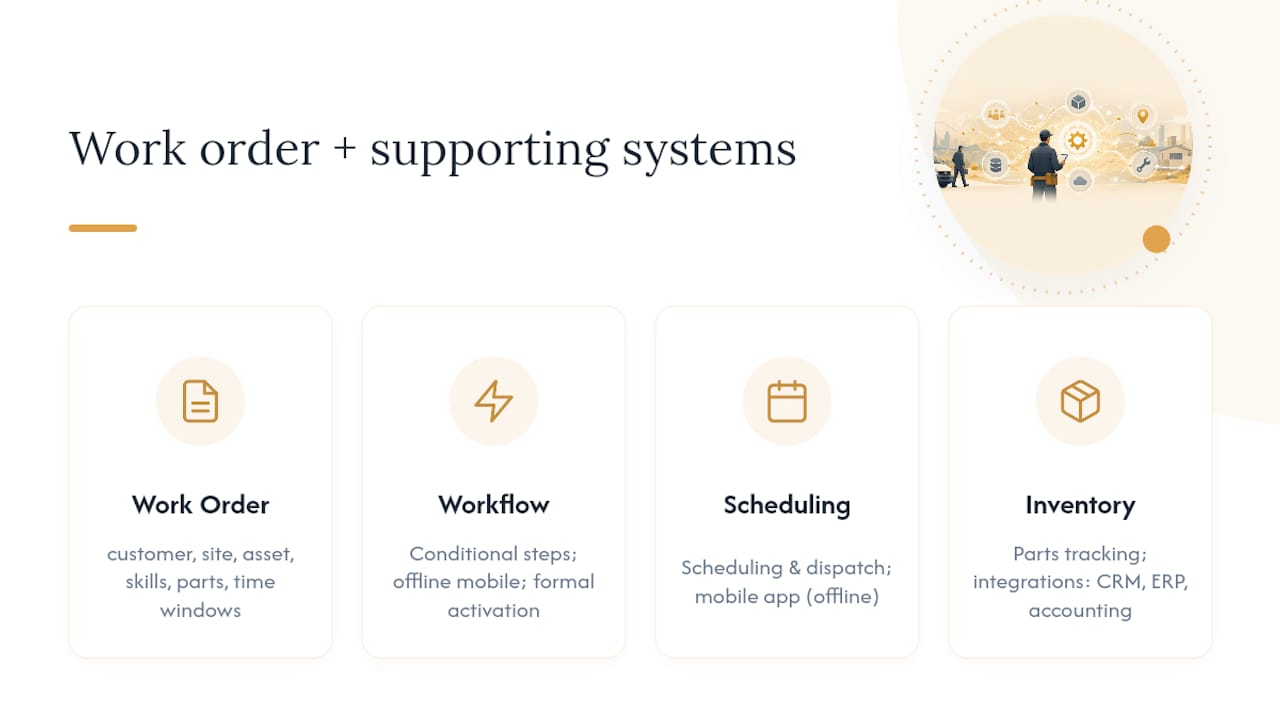
Beyond the work order itself, you need a workflow engine that handles conditional logic. Oracle's Fusion Field Service documentation describes this as step-by-step guidance with conditional visibility rules, so a step only appears when it's relevant (a parts-shortage step, for instance, only shows up if inventory flags a gap), plus offline-capable mobile execution and a formal activation process for configured workflows, per Oracle's Workflow Manager documentation.
Round out the architecture with scheduling and dispatch tools, a mobile app that works offline, parts and inventory tracking, and integrations into your CRM, ERP, and accounting systems.
Pro Tip: The most common underdesign mistake is leaving completion fields optional. If a technician can close a job without noting the parts used or the fault code, you lose the data that would have caught the pattern before it became a recall.
How Do You Design and Pilot a Field Service Workflow?
Building a workflow that survives contact with real technicians takes a sequence, not a leap:
- Map the current state, including every handoff and delay point.
- Define the outcome each workflow step should produce and what triggers it.
- Design the steps and mobile forms around that outcome.
- Configure automation and connect the systems that need to talk to each other.
- Pilot with a small crew on a limited job type.
- Review KPIs weekly and adjust before wider rollout.
- Scale once the pilot clears its acceptance criteria.
A pilot only proves anything if it stress-tests real variation. Run it against these test cases:
- A routine repair with no complications
- A preventive maintenance visit on a known schedule
- An emergency call with a compressed response window
- A parts-shortage scenario that forces an exception path
Low-code and no-code platforms let ops teams build these test workflows and iterate on real feedback without a development sprint, according to Zipflow's guide to field service operations.
Pro Tip: Ask technicians directly what slowed them down during the pilot week. Their answer is almost always more useful than the dashboard, because they'll tell you which mandatory field they skipped and why.

What Mistakes Slow Down Field Service Workflow Rollouts?
Most failed rollouts share the same handful of root causes.
- Too many exceptions built in from day one. Start with the 80% case and add exception paths only once they actually occur.
- Poor intake fields that miss the asset or skill requirement. Fix by making those fields mandatory before a job can even be scheduled.
- Ignoring technician UX. A form that takes four minutes to fill out will get skipped or falsified. Cut it to under a minute.
- Separate systems that require rekeying. Disconnected tools cause lost data and duplicate entry, per BuildOps' analysis of the field service process. One dropped handoff between dispatch and invoicing can cost a week of chasing paperwork; connecting the two closes that gap immediately.
- Skipping offline testing. A workflow that only works with full signal fails the moment a technician enters a basement.
What Do Technicians Need From a Mobile Field Service Workflow?
The mobile experience determines whether your workflow gets followed or worked around. Technicians need job context, asset history, checklists, photo capture, digital signatures, parts lists, GPS routing, and clear next-step instructions, all inside one app rather than scattered across texts and phone calls.
Offline behavior matters just as much as the feature list. A job submitted with no signal should queue locally and sync the moment connectivity returns, with clear conflict resolution if two updates land at once. Both Dynamics 365 and Oracle Fusion Field Service build offline sync into their mobile workflows for exactly this reason, per Dynamics 365's mobile guidance and Oracle's Workflow Manager documentation.
- Job context and asset history load before arrival
- Photos and signatures attach directly to the work order
- Submissions queue and sync automatically once back online
Pro Tip: Every mandatory field slows form completion by a few seconds. Keep the required list to what genuinely blocks invoicing or safety sign-off, and make everything else optional but visible.
What Should You Require in a Field Service Management Platform?
Run every demo against the same checklist so vendors get compared on equal footing, not on whoever gave the flashiest pitch.
- Workflow-builder flexibility and conditional logic
- Mobile app with genuine offline capability, not just a cached view
- Scheduling and dispatch with route or map optimization
- Parts and inventory tracking tied to the work order
- Integrations with your CRM, ERP, and accounting stack
- Automation and AI features, such as suggested parts lists or predictive scheduling
- Reporting and SLA tracking built into the same platform
- Local support availability and a clear deployment and pricing model
During the demo, ask the vendor to do two things live:
- Build a conditional step that only appears when a part is marked out of stock.
- Show a technician completing a job fully offline, then syncing it back.
Score each answer as must-have, nice-to-have, or not needed for your operation, and let that rubric drive the shortlist rather than the sales deck.
Which Platforms Should Be on Your Shortlist?
Field service platforms split into three broad categories, and the differences show up fastest in how they handle conditional logic and offline work.
| Category | Workflow Flexibility | Mobile/Offline | Scheduling | Parts/Inventory | Best Fit |
|---|---|---|---|---|---|
| Enterprise platforms (Microsoft Dynamics 365 Field Service, Oracle Fusion Field Service, Salesforce Field Service, ServiceMax) | High, with conditional logic | Strong offline sync | Advanced optimization | Deep integration | Large multi-site operations |
| Trade-focused field apps (ServiceM8, simPRO, AroFlo) | Moderate, template-driven | Solid mobile UX | Good for small crews | Basic to moderate | Trades and small service teams |
| Low-code / specialized platforms (TrueContext, Fieldcode) | High, build-your-own forms | Configurable offline | Varies by build | Custom-built | Teams with unique inspection or compliance needs |
Microsoft Dynamics 365 Field Service and Oracle Fusion Field Service lean toward large, multi-team operations with complex asset hierarchies. ServiceM8, simPRO, and AroFlo target trades and small-to-mid service businesses that need scheduling and invoicing without enterprise overhead. TrueContext and Fieldcode focus on customizable inspection and workflow forms for teams with specific compliance needs, while Salesforce Field Service and ServiceMax sit in the enterprise tier alongside heavy CRM integration.
Run a two-week pilot on any finalist: load real work orders, test offline behavior in a low-signal building, and measure whether technicians actually finish forms faster than your current process. If they don't, that platform isn't the fix.
How Do You Roll Out and Measure a Field Service Workflow?
Before wider rollout, work through a short checklist: align stakeholders on scope, map your data fields, standardize forms across teams, test offline behavior in real dead zones, train staff on the new steps, define the pilot's boundaries, and set an escalation path for anything the workflow doesn't handle.
A pilot passes when technicians complete jobs without falling back to phone calls or paper, and when completion data comes back clean enough to invoice without follow-up questions.
| KPI | Target Direction | How to Measure |
|---|---|---|
| First-time fix rate | Increase | Jobs closed without a return visit |
| Travel time per job | Decrease | Dispatch-to-arrival tracking |
| Technician utilization | Increase | Billable hours vs. total shift hours |
| SLA compliance | Increase | Jobs closed within contracted window |
| Invoice lag | Decrease | Days between job close and invoice sent |
Why Coaching Speeds Up Field Service Workflow Adoption
Software alone doesn't change behavior. What actually drives adoption is prioritizing which use cases matter first, reinforcing new habits through training, and reviewing KPIs often enough to catch drift before it becomes the new normal.
Operations coaching pairs naturally with workflow rollouts because it forces the discipline most teams skip: a weekly review of the pilot's numbers instead of a "set it and forget it" launch. Champion Business Coaching's work with trade services businesses and service-based businesses centers on exactly this: turning a new process into a habit the team actually keeps.
- Prioritizes which workflow steps matter most before automating everything at once
- Builds accountability around KPI review, not just KPI reporting
- Supports the training loop that turns a pilot into a permanent habit
A note from the field
Run the smallest pilot that could possibly work, then measure it honestly. The teams that overbuild before testing almost always end up automating a broken process faster.
How Champion Business Coaching Supports Your Rollout
Most operations teams don't fail at picking software. They fail at the follow-through: nobody owns the KPI review, the pilot drags on for months, and the "temporary" workaround becomes permanent. Champion Business Coaching closes that gap with hands-on coaching built around your actual pilot data, not generic project management advice.

Champion works alongside operations leaders to prioritize which workflow steps to automate first, build the KPI habits that keep a pilot honest, and apply systemization practices that stop good processes from quietly falling apart after month three. For trades and service businesses specifically, that means turning a rollout plan into a set of routines the whole team actually follows, backed by Champion's 90-day coaching guarantee.
If you're mapping a workflow pilot right now, book a consultation with Champion Business Coaching and get a second set of eyes on your KPI targets before you scale.
Sources
- Deliver services on mobile — Dynamics 365 guidance
- Workflow Manager — Oracle Fusion Field Service documentation
- The Field Service Management Workflow: From request to resolution — Youreka
- The Field Service Management Workflow, Step by Step — BuildOps
- The Complete Guide to Field Service Operations — Zipflow