
AI workflow automation is software that combines an orchestration engine, AI models, and API connectors to run multi-step business processes end-to-end with minimal human intervention. If your team still manually routes leads, copies data between tools, or chases invoice approvals, this is where you start cutting that work. Workflow automation acts as the digital connective tissue of a business, linking tools and triggering actions without anyone touching a keyboard. The ROI case is concrete: businesses save significant time per employee per year through AI-powered automation through AI-powered automation, and adoption has risen sharply across companies of every size.
Who should prioritize this now? Technical teams with repeatable, data-heavy processes, operations managers drowning in handoffs, and small-to-mid-size businesses running the same five tasks every week on manual effort. The platforms have matured enough that no-code AI automation tools let non-technical users build agentic automations in an afternoon, while developer-first and enterprise platforms handle the governance and scale that regulated industries demand.
Three things separate modern AI workflow automation from older rule-based tools:
- AI judgment: LLMs and ML models make context-sensitive decisions mid-workflow, not just binary if/then branches.
- Agentic execution: Agentic workflows move beyond chat prompts to end-to-end agents that can perform multi-step operations like payroll planning or month-end close when connected to business tools.
- Observability by default: Production-grade platforms ship with audit logs, tracing, and rollback so you can see exactly what ran, when, and why.
Key Takeaways
The most effective approach to AI workflow automation is to start with a single high-frequency use case, build governance controls in from the start, and match the platform class to your team's actual technical skill.
| Point | Details |
|---|---|
| Start with one use case | Pick a process that runs frequently and has a recoverable error cost before expanding. |
| Match platform to team skill | No-code for ops, low-code for mixed teams, developer-first for engineering, enterprise for regulated industries. |
| Governance from day one | Audit logs, human-in-loop checkpoints, and confidence thresholds are not optional for production workflows. |
| 114 hours saved per employee per year | AI automation delivers measurable time savings (an average of 114 hours per employee per year); track baseline metrics before deploying so you can prove ROI. |
| Agentic workflows are the next step | Moving from single-task automation to end-to-end agents that connect to business tools produces the largest efficiency gains. |
Table of Contents
- What does a modern AI workflow automation stack actually contain?
- How does an AI-driven workflow actually execute?
- Which tool class fits your team, and what are the real options?
- What are the highest-ROI use cases to automate first?
- No-code, low-code, or pro-code: which one should your team choose?
- The gap between what AI automation promises and what actually ships
- Useful sources and further reading
What does a modern AI workflow automation stack actually contain?
Understanding the stack matters because every vendor maps their features to one or more of these layers. When you evaluate a platform, you are really asking which layers it covers well and which you have to bring yourself.
Triggers and events are the starting point. A webhook fires when a form is submitted, a schedule runs at 2 AM, or a database row changes. Without a reliable trigger layer, nothing runs.
The orchestration engine is the coordinator. It sequences steps, manages state across long-running workflows, handles retries on failure, and routes branching logic. This is where the difference between traditional and AI-driven automation shows up most clearly. A rule-based orchestrator follows a fixed decision tree. An AI-driven orchestrator can call a language model mid-run to interpret an ambiguous input and choose the next step dynamically.
Connectors and APIs are the integration surface. Prebuilt connectors to Salesforce, Slack, QuickBooks, or Google Workspace reduce setup time from days to hours. The number of native connectors a platform ships matters enormously for small teams that cannot afford custom API work.
The AI layer is where the intelligence lives. It includes:
- Large language models (LLMs) for text classification, summarization, drafting, and decision-making
- ML models for prediction and scoring (lead quality, fraud risk, churn probability)
- Retrieval-augmented generation (RAG) with a vector database for grounding model outputs in your own documents and data
- Optical character recognition (OCR) and robotic process automation (RPA) for extracting data from PDFs, invoices, and legacy screens
Observability and audit logs track every step. A full trace shows which model was called, what input it received, what it returned, and whether a human approved the action. Durable execution and self-healing retries are critical here because most workflow failures trace back to brittle external dependencies, not bad logic.
Human-in-the-loop controls pause execution at defined checkpoints and route sensitive actions to a human reviewer before proceeding. For financial approvals or customer-facing messages, this layer is not optional.
Traditional rule-based automation handles the predictable. AI-driven automation handles the ambiguous, the variable, and the judgment-heavy, which is why the two approaches are increasingly combined in the same workflow rather than treated as alternatives.
How does an AI-driven workflow actually execute?
Walk through a concrete example: a B2B lead capture workflow. A prospect fills out a demo request form on your website at 11 PM.
- Action connectors — The orchestrator writes the enriched record to Salesforce, posts a Slack notification to the sales channel, and queues the follow-up email in your email platform.
The retry and durable execution layer is what separates production workflows from demos. A single API timeout should not kill a workflow that has already done five steps of useful work. Platforms with built-in compensation semantics can roll back partial actions or resume from the last successful step.
Tracing is equally important. When something goes wrong at 2 AM, you need a full execution log that shows the exact model call, the input payload, the output, and which connector failed. Without that, debugging is guesswork.
Human-in-loop checkpoints are inserted by defining a step type that pauses execution, sends a notification, and waits for an approval signal before continuing. The checkpoint can include a timeout: if no one approves within four hours, the workflow escalates or takes a safe default action.
Which tool class fits your team, and what are the real options?
The market breaks into four classes. Picking the wrong one costs you months of rework.
The four tool classes
No-code platforms (Zapier, IFTTT, Make) are built for non-technical users. You connect apps through a visual interface, set triggers and actions, and deploy in hours. They handle linear workflows well. Complex branching, custom AI logic, or enterprise governance are where they hit ceilings.
Low-code / visual-builder platforms (Make's advanced scenarios, Langflow) let you drag and drop multi-step flows and add code blocks where needed. Langflow's visual builder lets teams prototype agentic workflows and extend them with Python for production-grade integrations, which makes it a strong bridge between non-technical prototyping and engineering handoff.
Developer-first platforms (n8n, self-hosted Make) give engineering teams full control over logic, hosting, and data residency. n8n is open-source, self-hostable, and has a large community contributing workflow templates. The tradeoff is that someone on your team needs to own the infrastructure.
Enterprise orchestration platforms (UiPath Maestro Flow, IBM watsonx) combine agentic reasoning with deterministic logic, durable execution, traceability, and role-based access controls. UiPath Maestro Flow covers developer-first orchestration with unified traces, durable execution, and governance built for regulated industries. IBM's watsonx suite adds enterprise AI governance on top of workflow orchestration, including model risk management and audit trails.
Platform comparison
| Dimension | No-code (Zapier, IFTTT) | Low-code / visual (Make, Langflow) | Developer-first (n8n) | Enterprise orchestration (UiPath, IBM) |
|---|---|---|---|---|
| Best for | Non-technical ops teams | Mixed teams, prototyping | Engineering orgs | Regulated enterprises |
| Ease of use | High | Medium | Medium-low | Low-medium |
| Integrations | thousands prebuilt (Zapier) | Hundreds; extensible | Hundreds; open-source community | Deep enterprise connectors |
| Hosting model | Cloud only | Cloud; some self-host | Cloud or self-host | Cloud, on-prem, hybrid |
| AI capabilities | Basic LLM steps | Agentic flows, RAG support | LLM nodes, custom agents | Full agentic + ML + RPA |
| Governance & audit | Minimal | Moderate | Configurable | Enterprise-grade |
| Pricing posture | Per-task; scales fast | Mid-range | Open-source core; paid cloud | Enterprise contract |
| Scalability | Limited at volume | Moderate | High with self-hosting | Designed for enterprise scale |
Rippling sits in a different category: it is an HR and IT platform with built-in workflow automation for employee lifecycle events. If your primary use case is onboarding, offboarding, or device provisioning, Rippling's native automation removes the need for a separate orchestration tool entirely.
Pro Tip: Start with the platform your team will actually use, not the most powerful one. A Zapier workflow that runs in production beats a UiPath deployment that stalls in procurement for six months.
What are the highest-ROI use cases to automate first?
The best first automation project has three properties: it runs frequently, it follows a mostly predictable pattern, and a mistake is recoverable. Here are the use cases that consistently deliver fast returns.
Lead routing and qualification. An AI model scores inbound leads against your ICP, enriches the record with firmographic data, and routes high-priority leads to the right rep within minutes of submission. The deterministic part handles the routing rules; the AI part handles the scoring and the personalized outreach draft. Teams typically track response time (target: under five minutes for hot leads) and conversion rate by lead source.

Customer support triage. Incoming support tickets are classified by intent, urgency, and product area. Routine questions trigger an AI-drafted response for agent review; complex or angry tickets escalate immediately to a senior agent with full context attached. Embedding AI into existing productivity apps reduces friction and enables rapid adoption for small teams, which is why many support teams start with a Gemini or Copilot integration inside their existing helpdesk before moving to a dedicated orchestration platform. Track first-response time and deflection rate. For a deeper look at this use case, AI for customer service covers practical implementation patterns.
Invoice processing and AP automation. OCR extracts line items from PDF invoices, an ML model matches them to purchase orders, and the workflow routes exceptions to a human reviewer. Straight-through processing rates above 80% are achievable for structured invoice formats. Track exception rate and processing time per invoice.
Employee onboarding. A new hire triggers a workflow that provisions accounts, assigns training modules, schedules intro meetings, and sends a welcome package. Rippling handles much of this natively for HR and IT provisioning. The AI layer adds value in generating role-specific onboarding plans from a job description. For context on the HR systems that feed these workflows, HR software for SMEs covers the integration landscape.
Weekly reporting and cash forecasting. A scheduled workflow pulls data from your accounting system, CRM, and ops tools, runs it through a model that generates a narrative summary and flags anomalies, and emails the report to leadership every Monday at 7 AM. The AI part is the narrative generation and anomaly detection; the deterministic part is the data pull and formatting. Track time saved per report cycle and accuracy of flagged anomalies.
Pro Tip: Pick the use case where your team currently spends the most time on copy-paste work between two systems. That handoff is almost always the fastest win and the easiest to justify to a skeptical stakeholder.
No-code, low-code, or pro-code: which one should your team choose?
The honest answer is that most organizations end up using more than one. A no-code tool handles the ops team's simple automations; a developer-first platform runs the production-critical workflows that need custom logic and self-hosting.
Decision matrix
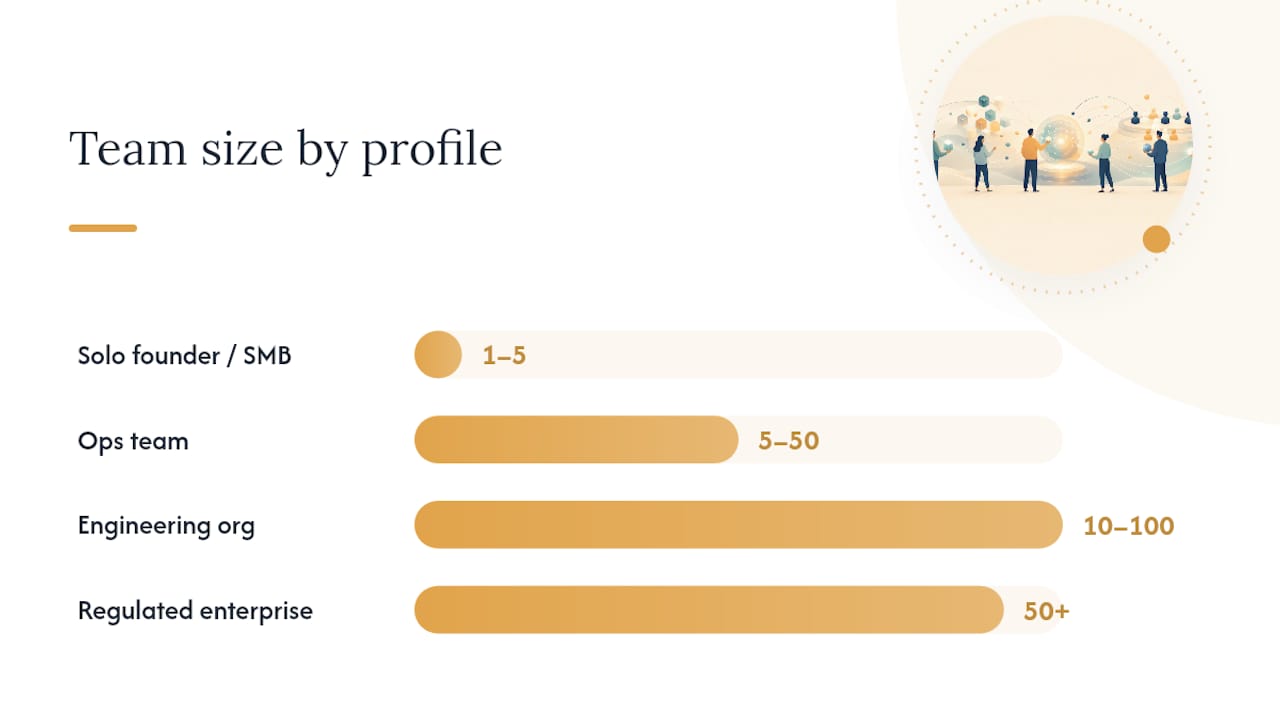
| Profile | Team size | Technical skill | Compliance need | Recommended class |
|---|---|---|---|---|
| Solo founder / SMB owner | 1–5 | Low | Low | No-code (Zapier, IFTTT) |
| Ops team, mixed skills | 5–50 | Low-medium | Medium | Low-code (Make, Langflow) |
| Engineering org | 10–100 | High | Medium-high | Developer-first (n8n) |
| Regulated enterprise | 50+ | High | High | Enterprise orchestration (UiPath, IBM watsonx) |
One-line recommendations:
- Startup founder: Use Zapier or Make to automate your top three manual tasks this week. You do not need a developer.
- Ops team: Start with Make or a Google Workspace + Gemini integration. Prototype in a week, then hand off to engineering if the workflow needs custom logic.
- Engineering org: n8n's self-hosted option gives you full control over data residency and workflow logic. The open-source community has templates for most common patterns.
- Regulated enterprise: UiPath Maestro Flow or IBM watsonx gives you the governance, audit trails, and enterprise connectors that compliance teams will actually sign off on.
Key tradeoffs to weigh:
- Speed of delivery vs. control. No-code ships in hours but hits walls quickly. Pro-code takes weeks but gives you full flexibility.
- Portability. Workflows built on proprietary no-code platforms are hard to migrate. Self-hosted open-source platforms (n8n, self-hosted Langflow) give you portability.
- Observability. Enterprise platforms ship observability as a first-class feature. No-code platforms often provide only basic run logs.
- Total cost of ownership. Per-task pricing on no-code platforms scales fast at volume. Self-hosted developer platforms have lower variable costs but higher engineering overhead.
MIT Sloan research confirms that generative AI raises productivity for skilled workers when combined with process redesign and training, not just tool deployment. The platform choice matters less than whether your team understands the process they are automating and has been trained to work alongside the new workflow.
The gap between what AI automation promises and what actually ships
There is a version of this topic that reads like a vendor brochure: pick a platform, connect your apps, watch the hours disappear. The reality is messier, and the gap is almost always in the same two places.
First, the process. Most teams try to automate a process they have not fully mapped. They know the happy path but not the exceptions, and exceptions are where AI workflows fail visibly. Before you touch a platform, spend a day with the person who currently does the task manually. Watch them handle the weird cases. Those are the cases your workflow will encounter on day three in production.
Second, the change management. The MIT Sloan research on generative AI productivity is clear that gains come when AI is paired with process redesign and adequate training, not when it is dropped on top of an existing broken process. The teams that get the most out of automation are the ones that redesign the process first and then automate the redesigned version. That is a coaching and strategy problem as much as a technical one.
The platforms covered here, from Zapier's simplicity to UiPath's enterprise depth, are genuinely capable. The bottleneck is almost never the software. It is the clarity of the process, the quality of the data, and whether the people running the workflow trust it enough to let it run.
If you are a business owner or ops leader trying to figure out where to start, the operational efficiency frameworks that underpin good automation projects are the same ones that underpin good business improvement generally. Get those right first, and the technology follows.
Championbusinesscoaching works with business owners across industries to build the strategic clarity that makes automation projects actually stick. If you want a structured approach to identifying your highest-value automation opportunities and building the internal capability to run them, explore the coaching programs designed to do exactly that.
Useful sources and further reading
The sources below are worth bookmarking if you are moving from reading to building.
- AI Software for Small Business — Arahi AI
- Claude (Anthropic)
- 12 Small Business Automation Ideas & Tools for Efficiency — Rippling
- Langflow product page — IBM
- Maestro Flow — UiPath
- Google Workspace with Gemini resources — Google
- MIT Sloan — How generative AI can boost productivity
- Definable.ai — workflow best practices