
If your business uses AI in any capacity, you need a written AI policy for employees and a named owner accountable for it, starting today. The fastest path is the one-page template further down this guide: pick it, fill in five decisions, and assign someone to own it before the next tool gets adopted without anyone noticing.
TL;DR:
- Most small businesses should assign a dedicated owner to oversee the AI policy and maintain a clear log of tool approvals and exceptions.
- Data rules mandate that customer, financial, or health information must never be input into public AI tools unless protected by contracts and security measures.
- Approved tools require signed agreements, limited access, and compliance checks, with restricted use for free or unapproved tools until reviewed.
- Effective policy adoption relies on short training sessions, user-friendly procedures, and structured pilot programs rather than passive communication.
- Regular reviews, staff acknowledgment of policy updates, and ongoing incident monitoring are essential to ensure compliance and adapt to evolving AI tools.
Table of Contents
- Why Every Business Needs an AI Policy for Employees
- Copy This AI Policy Template and Adapt It
- What Should an AI Policy for Employees Actually Include?
- Who Owns the AI Policy and Who Approves New Tools?
- What Data Rules Belong in an AI Policy?
- Which AI Tools Should You Approve, Restrict, or Ban?
- How Do You Get Staff to Actually Follow the Policy?
- How Should You Monitor and Enforce the AI Policy?
- How Often Should You Review Your AI Policy?
- A One-Page AI Policy You Can Use This Week
- Why Most AI Policies Fail Before They Even Launch
- Get Help Rolling Out Your AI Policy the Right Way
- Sources
Why Every Business Needs an AI Policy for Employees
A written policy isn't red tape. It's the document that tells your team what's allowed, what's off limits, and who to ask when they're not sure. Without one, staff make those calls themselves, often pasting customer data into a free chatbot they found on Friday afternoon.
The National AI Centre recommends every organization using AI put in writing what it can and can't be used for, who signs off on higher-risk uses, how data gets handled, and how often the document gets reviewed. That's the whole job, stripped of jargon. An AI policy also functions as a transparency tool for auditors, clients, and regulators, not just an internal rulebook, according to the National AI Centre's guidance. When a client or auditor asks how you're managing AI risk, this document is your answer.
Copy This AI Policy Template and Adapt It
A workplace AI policy needs eleven working parts. Skip one and you'll find the gap the hard way, usually during an incident review.
- Purpose. State why the policy exists in one sentence: "This policy sets out how employees may use AI tools while protecting company and customer data."
- Scope. Name who it covers: all staff, contractors, and any AI tool used for work purposes, including personal accounts used on work matters.
- Definitions. Define "generative AI," "AI tool," and "personal information" in plain terms so nobody argues semantics later.
- Approved tools. List sanctioned tools by name, and state that anything not listed requires approval first.
- Data handling. Set the rule: no customer-identifying information, financial data, or trade secrets go into public AI tools.
- Human oversight. Require a person to review and approve any AI output before it reaches a customer, a contract, or a decision affecting someone's employment.
- Roles and approvals. Name the policy owner and who approves new tools or higher-risk use cases.
- Monitoring. State that tool usage may be logged and reviewed for compliance, consistent with existing IT monitoring practices.
- Incident reporting. Give a named contact and channel for reporting a suspected data leak or misuse.
- Enforcement. Describe consequences, from a training refresher for a first mistake to formal disciplinary action for willful breaches.
- Review. Set a date, an owner, and a trigger list for updates.
For regulated sectors like NDIS providers, mortgage brokers, or bookkeepers, tighten the data handling and human oversight clauses specifically. Add a line requiring dual sign off on any AI-assisted output tied to compliance obligations, client funds, or health information.
What Should an AI Policy for Employees Actually Include?
Strip away the formatting and a workplace AI policy comes down to seven non-negotiable clauses. Miss any of these and the policy won't hold up under audit or in a real incident.
- Purpose and scope stated in plain language. If a new hire can't summarize what's covered in one sentence after reading it, rewrite it.
- Approved and prohibited tools named explicitly. Vague language like "use AI responsibly" gives staff nothing to act on.
- Data classification rules with real examples. Say plainly that customer names, health records, and financial account numbers never go into a public AI tool, while a public job ad draft is fine.
- Human review requirements for anything customer-facing or decision-affecting. The Digital Transformation Agency's guidance on public generative AI use puts human oversight at the center of safe adoption, and that principle holds for any workplace, not just government teams.
- Training and signed acknowledgement. A policy nobody has read is not a policy, it's a liability.
- Enforcement steps and a reporting channel. Staff need to know exactly where to go if something goes wrong.
- A review schedule with a named owner. Stale policies get quietly ignored.
Pro Tip: Run a fifteen-minute audit against this list with two people from different departments. If they disagree on what's approved, your policy language is too vague, not your people.
Who Owns the AI Policy and Who Approves New Tools?
Somebody specific has to own this document, not "the leadership team" in the abstract. In most small and midsized businesses, that's the head of operations, the person already responsible for HR policy, or a compliance lead if you have one. In larger organizations, it often sits with a CTO or an IT security lead who already owns related policies.
Set up tiered approvals so low-stakes decisions don't get stuck in a queue. A staff member drafting a social media caption with an approved tool needs no sign off. Using AI to summarize a customer complaint that includes personal details needs a manager's approval. Feeding financial records into any tool needs sign off from the policy owner directly.
Keep a simple log of three things:
- Every new tool request and its approval or rejection, with a date and reason.
- Any exception granted outside standard policy, and why.
- Which department or role each approved tool is cleared for.
This log matters more than most business owners expect. It's what you show a client, an insurer, or an auditor when they ask how AI decisions get made. Tie this governance directly to whoever already owns your data security and privacy obligations. If those are separate people, put them in the same approval chain so a new AI tool gets checked against both angles before it goes live.
What Data Rules Belong in an AI Policy?
Sort your business data into three tiers before you write another word of policy. Public data is anything already on your website or marketing material. Internal data covers day-to-day operational information not meant for outside eyes, like draft pricing or internal memos. Restricted data is anything that identifies a customer, an employee, or exposes financial or health information.
The rule of thumb that solves ninety percent of real-world questions: no customer-identifying data goes into a public AI tool, full stop. A staff member can ask a public chatbot to draft a generic email template, but they cannot paste in a client's name, account number, or medical note to get help wording a response.
The OAIC's guidance on commercially available AI products is blunt about this: existing privacy obligations under the Privacy Act don't disappear because the tool is new. If you're already navigating how the Privacy Act applies to your business, your AI policy needs to sit on top of that framework, not replace it.
Before any vendor gets approved, check three things:
- A signed data processing agreement (DPA) is in place.
- The contract explicitly states your data won't be used to train the vendor's models.
- The tool supports single sign on (SSO) so access can be revoked instantly if someone leaves.
On the technical side, layer in data loss prevention (DLP) tools and usage logging wherever possible. The Cyber recommends exactly this kind of layered control, treating AI tools the same way you'd treat any other software touching sensitive data.
Which AI Tools Should You Approve, Restrict, or Ban?
Not every AI tool deserves the same trust level, so build a three-tier system instead of a single yes-or-no list.
- Sanctioned tools. These run on an enterprise contract with a signed DPA and a no-training clause. Staff can use these with internal data because the vendor relationship has already been checked.
- Conditional tools. Free or consumer-grade AI products fall here. They're allowed only for public, non-sensitive tasks, and only after a department head signs off on the specific use case.
- Prohibited by default. Anything not on the approved or conditional list is off limits until it's been reviewed. This flips the usual assumption. Staff don't get to try a new tool and ask forgiveness later; they ask first.
Before adding any tool to the sanctioned list, run it through a short onboarding checklist:
- Confirm the vendor's security posture, including whether they hold SOC 2 or ISO 27001 certification.
- Get the data processing agreement in writing, with a no-training clause specified.
- Check the data retention period and whether you can request deletion.
- Confirm SSO and audit logging are available.
If you're vetting a new AI vendor for the first time, the due diligence framework in this vendor assessment guide covers the procurement questions worth asking before you sign anything, even outside a marketing context.
How Do You Get Staff to Actually Follow the Policy?
A policy sitting in a shared drive changes nothing. Adoption happens through repetition, not a single announcement email.
Start with mandatory training paired with an active, timestamped acknowledgement, not a passive "policy attached" email nobody opens. Follow up with short, point-of-use reminders: a one-page job aid pinned near the tools people actually use, not buried in a forty-page handbook.
- Announce the policy through leadership directly, not just HR, so staff understand it's a business priority.
- Refresh training every six to twelve months, and immediately after any material policy change.
- Track three numbers: training completion rate, signed acknowledgement rate, and reported incidents over time.
- Make the approved path the easy path. If sanctioned tools are harder to access than free public ones, staff will default to the free ones regardless of what the policy says.
Pro Tip: Pair your policy rollout with a short pilot, like a two-week trial of one approved tool in one department. Staff trust a policy more when they've seen it applied to a real task, not just read about it.
If you're piloting a specific tool, a structured approach like the 90-day ChatGPT rollout playbook shows what a phased adoption actually looks like in practice, from first trial to full team rollout.
How Should You Monitor and Enforce the AI Policy?
Detection has to come before enforcement, and it should never feel like a trap. Use SSO logs and DLP tools to attribute usage to specific accounts and flag when sensitive data gets typed into an unapproved tool. This isn't about catching people out. It's about knowing where the real risk sits before it becomes an incident.
- Set up detection quietly in the background. Staff should know monitoring exists, but daily work shouldn't feel surveilled.
- Give every incident a clear reporting path. Name the contact, whether that's a manager, HR, or IT, and make the first step obvious: report it, don't hide it.
- Apply graduated consequences. An employee who accidentally pastes a client's email into a public tool during their first week needs coaching and a training refresher, not a formal warning. Someone who repeatedly bypasses approved tools despite training needs a documented escalation.
- Review every incident after the fact. Ask what let it happen and whether the policy, the training, or the tool access needs to change, then update accordingly.
Treat the same caution consistently. If a customer-data mistake in a chatbot draws a warning, an equally risky mistake feeding financial records into an unapproved tool needs the same level of response, not a lighter one just because it happened in a different department.
How Often Should You Review Your AI Policy?
AI tools change fast enough that a policy written eighteen months ago is probably already out of date somewhere. Put the owner's name, the last review date, and the next scheduled review date right in the document header, not buried in an appendix.
- Require staff to re-acknowledge the policy whenever a material change happens, not just annually.
- Set specific triggers for an off-cycle review: a new tool request, a near-miss incident, or a regulatory update like a change to the Privacy Act.
- Industry guidance from the Department of Industry's AI adoption resources points to a six to twelve month cycle as the practical baseline for most businesses.
- Keep a short change log, even just a table with date, change, and reason, so you can show an auditor exactly how the policy has evolved.
A One-Page AI Policy You Can Use This Week
Small and midsized businesses don't need forty pages to start. A one-page policy built around five decisions gets you covered, according to guidance from VibeZero's Australian template, and you can expand into longer, sector-specific appendices later if your business genuinely needs them.
The five decisions your one page needs to answer:
- Which tools are allowed? Name them specifically, don't just say "approved AI tools."
- What's completely off limits? State it plainly: no customer data, no financial records, no health information in any public tool.
- What's the customer-data rule in one line? Something like: "If it identifies a real person, it doesn't go into a public AI tool."
- Who signs off on anything new? One name, one email address, no committee.
- When does this get reviewed? A specific date, not "periodically."
Fill in the custom fields (company name, owner name, tool list, review date), get it signed by leadership, and distribute it before your next team meeting. If your business operates in a regulated space or handles unusually sensitive data, treat this one-pager as the foundation and build a longer appendix for role-specific rules once the basics are locked in. For a look at how approved tools work in one common use case, the meeting note taker guide shows what "safe by default" looks like for one specific job.
Why Most AI Policies Fail Before They Even Launch
Most AI policies I've seen fail for a boring reason: nobody made following them easier than ignoring them. A business writes a solid document, circulates it once, and assumes behavior will change because the words are correct. It won't. Staff adopt whatever tool solves their problem fastest, and if the sanctioned option is clunky or hard to access, they'll go around it within a week.
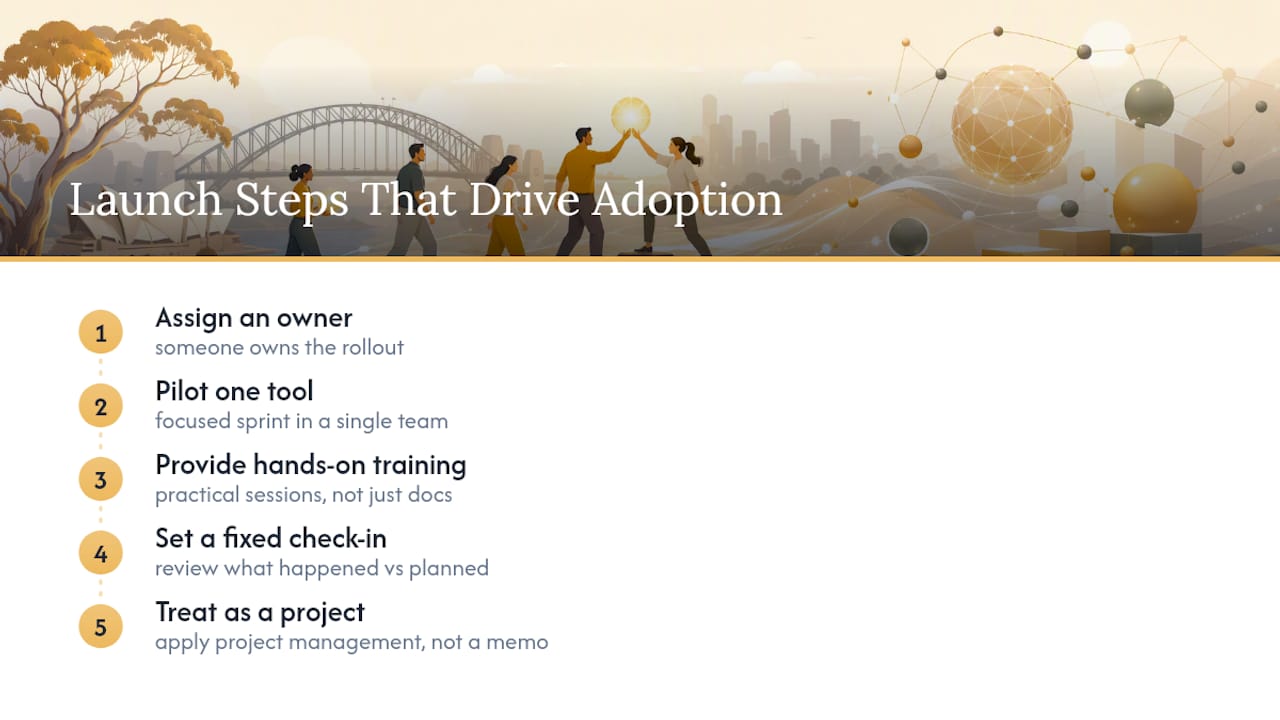
What actually shifts behavior is pairing the policy with a short, structured push. A focused sprint, a pilot of one approved tool in one team, hands-on training, and a fixed check-in date does more in thirty days than a perfectly worded policy does in a year sitting in a drawer. The document sets the rules. The rollout is what makes people follow them.
The businesses that get this right treat the policy launch the way they'd treat any operational change: someone owns it, there's a defined pilot period, and there's a review point to see what actually happened versus what was planned. That's not a compliance exercise. It's basic project management applied to a genuinely new kind of workplace tool, and the businesses adapting fastest to AI in the workforce tend to be the ones treating adoption as a process, not a memo.
— Duncan
Get Help Rolling Out Your AI Policy the Right Way
Writing the policy is the easy part. Getting an entire team to actually follow it, without slowing anyone down or creating a compliance headache, is where most businesses stall. Structured sessions to draft or tighten your policy, pilot periods to test it against real workflows, and follow-up coaching can help fix what doesn't stick.

A free consultation gets you a clear read on where your current AI practices stand, what's missing from your policy, and what a realistic 90-day rollout looks like for your team size and industry, backed by Championbusinesscoaching's 90-day guarantee. If you run a trades, NDIS, or service business and want that plan built around your specific compliance pressures, consider booking a session and bringing your current policy draft, or lack of one, to the table.
Sources
- Create an AI policy | National AI Centre
- Staff guidance on public generative AI
- Privacy guidance for organisations on AI | OAIC
- Cyber