
For most professional teams, the best category of AI meeting note taker is a searchable, integratable meeting-knowledge platform — one that doesn't just transcribe but turns every meeting into a retrievable, actionable record. Tools like Fireflies.ai and Otter lead this category. Otter, for example, turns meetings into a searchable knowledge base with AI chat that answers questions across your entire meeting history, not just the last call.
Two quick signals to guide your first trial:
- Who should start here: Teams running more than five recurring meetings per week, especially those pushing action items into a CRM or project management tool.
- Red flag to check first: Data retention defaults. Many tools store transcripts indefinitely unless an admin changes the setting. Before you connect a tool to sensitive client calls, confirm SOC 2 or ISO 27001 compliance and set a retention policy on day one.
The Zapier 2026 roundup of AI meeting assistants confirms that live capture quality, integrations, and follow-up automation are the three axes that actually separate these tools in practice. The right choice depends almost entirely on your primary workflow: searchable archive, live capture, or audio-first recording for noisy environments. That workflow-first framing shapes every recommendation below.
Key Takeaways
For most teams, a searchable, integratable meeting-knowledge platform delivers the strongest return from AI note-taking because it turns individual meetings into a queryable organizational asset.
| Point | Details |
|---|---|
| Workflow determines tool choice | Match the tool category to your primary need: searchable archive, live analytics, audio-first, or agenda-first collaboration. |
| Trial before committing | Run the 5-task trial script (back-to-back meetings, noise test, integration push, search test, export test) before upgrading to a paid plan. |
| Security setup is day-one work | Check retention defaults, data residency, and SOC 2 / ISO 27001 compliance before connecting any tool to sensitive meetings. |
| Hybrid workflow outperforms full automation | AI handles capture and synthesis; a human curator validates decisions and action-item ownership before downstream automation fires. |
| Championbusinesscoaching's coaching for coached adoption | Championbusinesscoaching's coaching-led pilot approach combines a governance checklist and a structured sprint to embed AI tools into team workflows. |
Table of Contents
- Which AI meeting note takers are worth your time?
- How do you choose the right AI note taker for your team?
- How we evaluated these tools
- How should teams actually use AI note takers safely?
- What's the final verdict on AI meeting note takers?
- Why the hybrid approach matters more than the tool you pick
- Coached AI adoption: a faster path than going it alone
- Sources
Which AI meeting note takers are worth your time?
Leading AI meeting note takers transcribe, summarize, and identify speakers, but they diverge sharply on search quality, integration depth, and what they actually deliver after the meeting ends. Here is the full comparison across the dimensions that matter most.
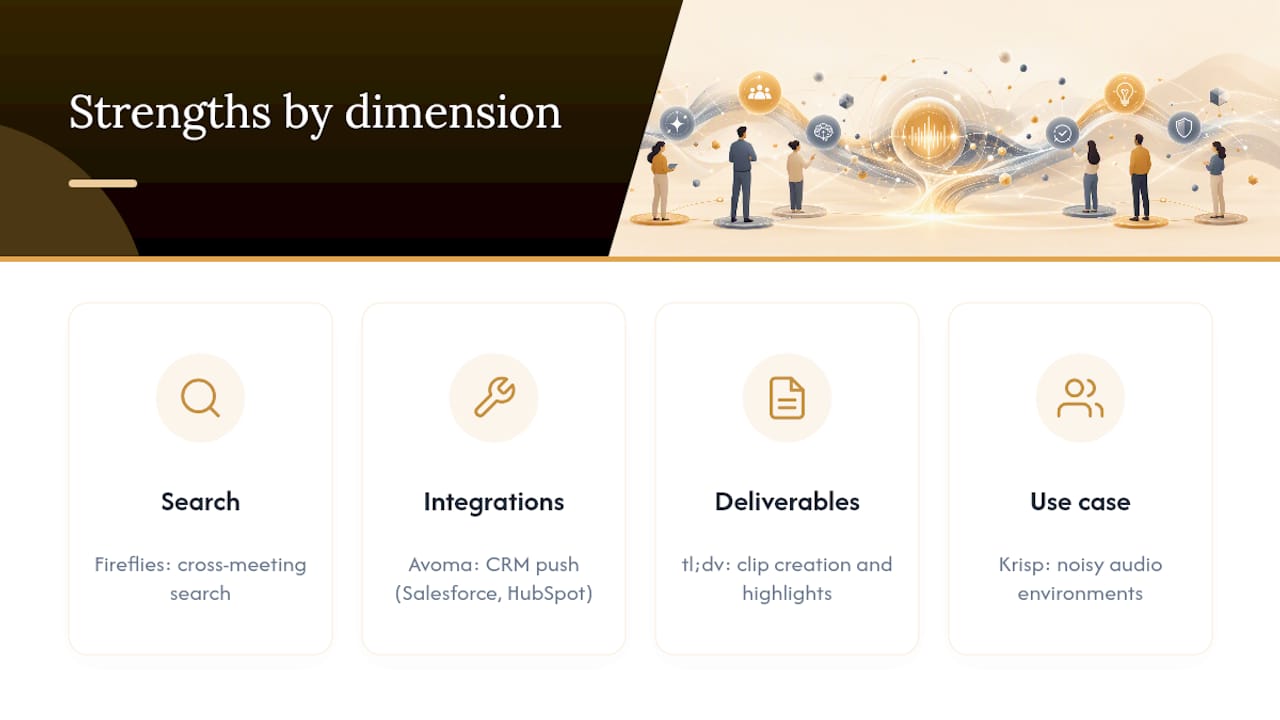
Fireflies.ai is the go-to for teams that need to search across dozens of past meetings fast. Its cross-meeting search and workflow integrations are genuinely strong, and the free plan is usable enough to run a real pilot. The main caveat: the free tier limits transcript storage, so enterprise teams will hit the ceiling quickly.
Otter sits in a slightly different lane. It's less about individual meeting capture and more about building a longitudinal knowledge base your whole team can query. The AI chat feature, which lets you ask questions across your entire meeting history, is the standout. Where it falls short is in the depth of its CRM integrations compared to Avoma.
tl;dv earns its place for teams that share meeting moments externally, think client demos, sales calls, or async team updates. Clip creation and highlight reels are its core strength. It's not the right choice if your primary need is deep search or analytics.
Fathom is the simplest tool on this list, and that's a genuine advantage for individuals or small teams who just want clean summaries and action items without configuring anything. Setup takes minutes. The tradeoff is limited search and no real knowledge-base functionality.
Krisp is the only tool here that leads with audio quality rather than note quality. Its noise cancellation paired with transcription makes it the obvious pick for field teams, open offices, or anyone on a noisy connection. Transcription accuracy in difficult audio conditions is noticeably better than most competitors.
Avoma is built for revenue teams. The coaching analytics, call scoring, and CRM-push workflows (Salesforce, HubSpot) make it the strongest option for sales managers who want to review rep performance alongside meeting notes. It's priced accordingly.
Granola targets enterprise teams that want live meeting analysis, not just post-call summaries. It's newer to the market but has attracted attention for its real-time feature set. Pricing requires a direct conversation with their team.
Fellow takes a different approach entirely: it starts with the meeting agenda, not the transcript. If your team already runs structured meetings with pre-set agendas, Fellow's collaborative notes and action tracking slot in naturally. It's the best option for teams that want AI-assisted notes without abandoning their existing meeting discipline.
Jamie and Bluedot both occupy the "clean and focused" tier. Jamie produces tidy team-oriented summaries with minimal setup. Bluedot's differentiator is downstream task automation, pushing action items directly into Notion, Linear, or your CRM without manual copy-paste.
Olva.ai is purpose-built for teams that want short, decision-focused outputs rather than full transcripts. If your team's primary pain point is "we can never remember what we actually decided," Olva's concise decision extraction is worth a look.
MeetGeek combines solid transcription with meeting analytics, making it a good fit for knowledge teams that want to track meeting patterns over time, not just capture individual calls. Its analytics layer is more developed than most tools at its price point.
Equal Time has limited publicly available feature and pricing information at this time.
Pro Tip: Before connecting any tool to live client or sensitive internal meetings, create a dedicated test account and run your first week on internal-only calls. Check the retention default in admin settings on day one — many tools default to indefinite storage.
How do you choose the right AI note taker for your team?
Start with your primary workflow. The right tool category depends on whether your team's core need is searchable history, live capture, or in-person recording — and no single tool dominates all three equally well.
Must-have vs. nice-to-have features
Must-have for most teams:
- Accurate transcription with speaker identification (diarization)
- Automatic action-item extraction with assignee tagging
- Native integration with your primary meeting platform (Zoom, Teams, or Google Meet)
- Admin controls for data retention and deletion
- SOC 2 compliance at minimum; ISO 27001 for enterprise or regulated industries
Nice-to-have (upgrade when the basics work):
- Cross-meeting AI search or knowledge-base chat
- CRM push (Salesforce, HubSpot) for customer-facing teams
- Clip creation and highlight sharing
- Meeting analytics and coaching dashboards
- SSO and role-based access controls
A 7-day trial script that actually tests fit
Run these five tasks in your first week before committing to a paid plan:
- Back-to-back meeting test. Schedule two consecutive 30-minute calls and check whether the tool correctly separates transcripts, assigns speakers, and generates distinct summaries for each.
- Noisy environment test. Join one call from a coffee shop or open office. Review transcription accuracy. If it degrades significantly, consider Krisp or a tool with built-in noise handling.
- Integration test. Push one set of action items to your project management tool or CRM manually via the integration. Confirm the data lands in the right fields.
- Cross-meeting search test. After three meetings, search for a specific decision or name. Evaluate how fast and accurately the tool surfaces the right moment.
- Export test. Export one full transcript and summary to PDF or your preferred format. Confirm you can retrieve your data independently of the vendor.
Questions to ask vendors before signing
- Where is meeting data stored, and in which region?
- What is the default retention period, and can admins override it?
- Can we export all data if we cancel?
- Do you hold SOC 2 Type II or ISO 27001 certification? Can you share the report?
- Is SSO included in the plan we're evaluating, or is it enterprise-only?
How we evaluated these tools
Our evaluation prioritizes real-world team workflows: searchability, integration reliability, and action-item accuracy, not just marketing claims. Deep suite integrations with tools like Microsoft 365 and Slack are an increasingly important differentiator for enterprise buyers, and we weighted that accordingly.
Test steps used:
- Live capture across Zoom, Google Meet, and Microsoft Teams with back-to-back scheduling
- Background noise simulation (open-office ambient audio) to stress-test transcription accuracy
- Export and integration test: pushing action items to Notion, Slack, and a CRM sandbox
- Cross-meeting search test: querying for specific decisions across five or more archived meetings
- Vendor documentation review: checking SOC 2 / ISO 27001 evidence, retention defaults, and admin controls against published product pages
Rating weights (approximate):
- Transcription and summary accuracy: 30%
- Integration depth and reliability: 25%
- Search and knowledge-base capability: 20%
- Security and compliance: 15%
- Pricing and free-plan usability: 10%
Vendor claims were verified against published documentation and product pages. Where claims could not be independently verified, they are noted as vendor-stated.
Pro Tip: Real-world accuracy varies by audio quality, accents, and domain-specific language. Build a short script using your team's actual terminology — product names, client names, internal acronyms — and run it as a transcription test before committing to a paid plan. Generic demos rarely surface the accuracy gaps that matter for your specific context.
How should teams actually use AI note takers safely?
The most effective pattern for most teams is hybrid: AI handles verbatim capture and generates suggested action items, while a human curator validates decisions and adds context before anything gets pushed downstream. Skipping the human validation step is where teams run into trouble, not with the transcription itself, but with AI-generated action items that misattribute ownership or miss the nuance of a conditional agreement.

Here's how that workflow looks in practice:
Pre-meeting: Confirm the tool is connected and retention settings are configured. Brief participants that the meeting is being recorded and transcribed.
Live capture: AI records, transcribes, and diarizes speakers in real time.
AI summary: Tool generates a draft summary, suggested action items, and (where supported) a searchable transcript.
Human curator validation: A designated team member reviews the AI output, confirms decision accuracy, corrects misattributed action items, and adds context the AI couldn't capture (tone, conditional agreements, off-the-record context).
Automated actions: Validated items push to your PM tool or CRM via integration.
This matters especially for regulated industries or client-facing teams. Zoom's AI note-taking documentation describes agentic workflows that can trigger follow-up actions automatically, which is powerful but also a reason to lock action-item ownership to a human review step before automation fires.
What to check on security and compliance
When evaluating enterprise readiness, request SOC 2 Type II or ISO 27001 evidence and check retention defaults. Many tools default to indefinite retention unless an admin changes the setting. Key items to verify:
- Data residency: where transcripts are stored and whether you can specify a region
- Encryption: AES-256 at rest and TLS in transit are the baseline
- Retention controls: can admins set automatic deletion after 30, 60, or 90 days?
- SSO and role-based access: is it included in standard plans or enterprise-only?
- Audit logs: can you see who accessed or exported a transcript?
Some "bot-free" tools use local desktop components that intercept system audio rather than joining as a meeting participant. That approach avoids the visible bot in the call, but it introduces endpoint resource use and its own privacy considerations worth weighing before deployment.
Pro Tip: Preserve conversational context by having your human curator add a one-paragraph "meeting context" note to each AI summary before it's shared. This prevents the AI output from being read without the background that makes the decisions intelligible weeks later.
What's the final verdict on AI meeting note takers?
For most professional teams in 2026, searchable, integratable meeting-knowledge platforms are the right starting point. Fireflies.ai and Otter lead that category. Avoma is the strongest pick for sales and customer-facing teams. Krisp wins for audio-challenged environments.
Three next steps to act on now:
- Pick one category. Match your primary workflow to a tool category: searchable archive (Fireflies.ai, Otter), live analytics (Granola, Avoma), audio-first (Krisp), or agenda-first collaboration (Fellow).
- Run the 7-day trial script. Use the five-task sequence from the evaluation section above. Don't skip the cross-meeting search test or the export test.
- Lock in retention and SSO settings on day one. Don't wait until you've accumulated sensitive transcripts to configure your data governance. Set retention limits and confirm compliance status before your first real client call.
One market caveat worth noting: feature parity across these tools shifts quickly. What differentiates Avoma from MeetGeek today may look different in six months. Plan to retest your shortlist every 6–12 months, especially as enterprise compliance requirements evolve.
Why the hybrid approach matters more than the tool you pick
Most teams spend too long comparing features and not long enough thinking about adoption. The tool is the easy part. Getting a team to actually use it consistently, validate AI outputs before they fire into a CRM, and build meeting summaries into their weekly rhythm — that's where most AI rollouts stall.
My honest view: the teams that get the most from AI note-taking aren't the ones with the most sophisticated tool. They're the ones with a clear owner for the human validation step and a short, repeatable post-meeting ritual. The AI handles the transcript. A person handles the judgment. That division of labor is what makes the whole system trustworthy.
For teams working through a coaching program, embedding an AI note-taker into the coaching sprint itself — using meeting summaries as inputs to weekly accountability reviews — is one of the fastest ways to turn captured decisions into measurable progress. Championbusinesscoaching's coaching plans are built around exactly that kind of structured sprint, with a 90-day guarantee behind the process.
Coached AI adoption: a faster path than going it alone
Tools like Fireflies.ai, Otter, and Avoma give your team the infrastructure for better meetings. What they don't give you is a process for turning meeting outputs into business results.
Championbusinesscoaching works with business owners and teams across Australia to do exactly that: take the action items your AI note-taker surfaces and build them into a structured accountability system with real follow-through. The difference between a tool that sits unused after week two and one that changes how your team operates usually comes down to one thing: a coached adoption sprint that makes the new workflow stick. There's no long-term lock-in, and the 90-day coaching guarantee means you see results or the session is free. If your team is ready to move from trialing a note-taker to actually operationalizing your meeting outputs, book a discovery call and we'll map out the right approach for your workflow.
Sources
The sources below back specific claims in this article and are worth reviewing before trialing any tool.
- Best AI Meeting Note Takers: Transcribe All Your Digital Meetings and More
- Otter Meeting Agent - AI Notetaker, Transcription, Insights
- Krisp AI Meeting Transcription | Smart Meeting Documentation