
AI for customer service delivers 24/7 responses, automates repetitive tickets, cuts cost per contact, and routes complex issues to human agents — all without a full engineering team. The fastest path to proving that value is a 30-day no-code pilot: connect an AI agent to one CRM (Zendesk or Intercom) and one channel (your website widget or WhatsApp), then measure deflection and CSAT against your current baseline.
Modern platforms like Mozochat let you deploy a support agent in under 10 minutes to a few days, with native integrations for CRMs and messaging apps. Kayako reports that most customers hit 80%+ ticket deflection within 90 days, at a cost model as low as $1 per AI-resolved ticket. Those numbers are not guaranteed for every business, but they give you a realistic pilot target. Championbusinesscoaching works with Australian business owners to scope, run, and measure exactly this kind of proof-of-concept.
- Pick one high-volume ticket type (FAQ, order status, or password reset) to automate first.
- Connect your existing knowledge base to the agent before launch.
- Set a human handoff rule from day one so no customer gets stuck.
- Track deflection rate, first response time (FRT), and CSAT weekly.
Table of Contents
- What does AI in customer service actually deliver?
- How do modern AI agents differ from old-school chatbots?
- Which customer service tasks should you automate first?
- How do you implement AI for customer service step by step?
- Why human-in-the-loop design is non-negotiable
- How do you make AI responses sound like your brand?
- What privacy and compliance checks do you need before launch?
- How do you measure success with the right KPIs?
- How do you choose between no-code platforms and custom builds?
- Three 30-day pilots you can run right now
- Key Takeaways
- What a coaching-led AI adoption actually looks like
- Useful sources and next reads
What does AI in customer service actually deliver?
The core benefits are speed, availability, and cost reduction. AI agents respond in seconds at any hour, which directly improves first response time and reduces the backlog that burns out human agents. Lenovo reduced agent handling time by 20% using Copilot in Dynamics 365 Customer Service, a benchmark worth keeping in mind when you set pilot targets.
Realistic limits matter too. AI performs well on structured, repeatable queries. It struggles when your knowledge base is outdated, when a customer's situation is genuinely unusual, or when the stakes are high enough to require human judgment. Setting those guardrails before launch is what separates a successful pilot from a PR problem.
Benchmark: Kayako's AI-first helpdesk model prices resolutions at a low per-action cost and reports high deflection rates for many customers after a few months.
How do modern AI agents differ from old-school chatbots?
The biggest mistake business owners make is treating a modern AI agent like a smarter version of a 2018 rule-tree chatbot. They are fundamentally different tools.
- Reasoning over rules. Modern agents, like those built on Salesforce's Agentforce platform, interpret intent and reason through multi-step requests rather than matching keywords to pre-written branches.
- Action execution. An agent can look up an order, process a refund within defined limits, update a contact record, or send a follow-up email — not just answer a question.
- Proactive outreach. Agents can trigger notifications for shipping delays, payment reminders, or outage alerts without waiting for a customer to ask.
- Context-aware escalation. When a case exceeds the agent's remit, it hands off to a human with the full conversation history attached, so the agent doesn't repeat the problem.
What still requires humans: high-stakes disputes, legal or medical queries, emotionally charged situations, and any decision where a wrong answer carries regulatory risk.
Which customer service tasks should you automate first?
Start with the tasks that are high-volume, low-complexity, and low-risk if the AI gets it slightly wrong.

Quick wins (automate in week one): FAQ responses, order and shipping status lookups, password resets, appointment bookings, and basic triage routing. One vendor reports a high share of conversations resolved by AI alone across its customer base, with gains in lead generation as a side effect of faster response times.
Mid-tier (add after the pilot proves out): Returns and refunds processing with defined guardrails, proactive outreach for payment reminders or delay notifications, and multilingual support for businesses serving diverse customer bases. Platforms like Kayako also offer audio transcription and ticket summarization that reduce manual effort on voice channels.
Avoid initially: Legal advice, complex billing disputes without a human in the loop, medical guidance, and any query where a confident wrong answer could cause real harm.
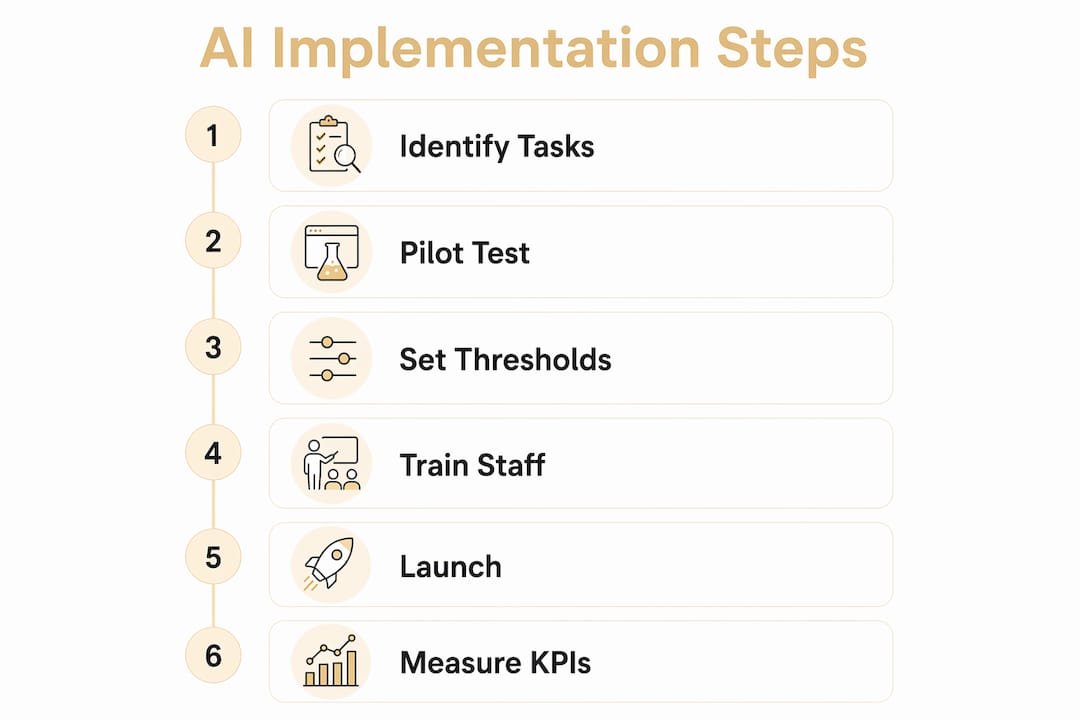
How do you implement AI for customer service step by step?
- Discovery and data hygiene (days 1–3). Audit your knowledge base. Outdated or contradictory content produces wrong answers. Fix it before you train anything.
- Define pilot scope (day 3–4). Pick one channel (website chat or WhatsApp), one CRM integration (Zendesk or Intercom), and two or three high-volume ticket types.
- Build and configure (days 4–7). Use a no-code platform. Google Cloud's drag-and-drop agent studio and similar tools let non-engineers build workflows in days. Set brand voice guidelines, approved phrases, and escalation triggers at this stage.
- Internal test (days 7–14). Run the agent against real historical tickets. Flag errors, refine responses, and confirm handoff rules fire correctly.
- 30-day live pilot. Go live with monitoring. Track deflection rate, FRT, average handle time (AHT), CSAT, and escalation rate weekly.
- Review and expand. If benchmarks are met, extend to additional ticket types or channels. If not, diagnose before scaling.
Pro Tip: Set a rollback threshold before launch — for example, if CSAT drops more than 5 points or escalation rate exceeds 30%, pause the agent and review. Having that number agreed in advance removes the politics from the decision.
Why human-in-the-loop design is non-negotiable
An AI agent without a clear handoff path is a liability. The goal is not to replace human agents but to let them focus on the cases that actually need them.
Define escalation triggers in plain language before you go live: high-value transactions above a set dollar amount, any message containing anger signals or legal language, privacy or data-access requests, and any conversation that has gone three or more turns without resolution. When those triggers fire, the agent must attach the full conversation context to the handoff and route to the right skill group immediately, not a generic queue.
Operationally, set an SLA for human response after handoff (15 minutes during business hours is a reasonable starting point), train staff to read the AI-generated context summary rather than asking the customer to repeat themselves, and keep an audit trail for QA review. Salesforce's Agentforce describes this as smart escalation with context — the principle applies regardless of which platform you use.
How do you make AI responses sound like your brand?
Generic AI responses erode trust fast. Customers notice when the tone shifts between your website copy and your support chat. Microsoft Dynamics 365 flags brand alignment as a core configuration requirement, not an afterthought.
- Write a one-page brand voice guide: approved phrases, banned phrases, tone descriptors, and response length limits.
- Feed the agent sample conversations from your best human agents.
- Use customer name, order context, and loyalty tier wherever the CRM provides it. A customer avatar guide helps define the segments your agent needs to serve differently.
- Run A/B tone tests during the pilot: compare a formal response variant against a conversational one and let CSAT data decide.
- Review flagged conversations weekly and retrain from real examples.
For a deeper look at aligning AI outputs with creative guidelines, the team at We Are CreativeCo covers brand-aligned AI strategy in practical terms.
What privacy and compliance checks do you need before launch?
Before any AI agent touches customer data, answer these questions in writing.
US compliance touchpoints: CCPA requires that California residents can request deletion of their data and opt out of data sales — your AI vendor's data-processing agreement must reflect this. If your business handles health information, HIPAA applies to any AI system that processes it, and your vendor needs a signed Business Associate Agreement. Ask every vendor for their SOC 2 Type II or ISO 27001 certification, their breach notification timeline (72 hours is the standard expectation), and their data deletion practices at contract end.
This article is general information, not legal or compliance advice. Confirm your specific obligations with a qualified privacy professional.
How do you measure success with the right KPIs?
| KPI | Why it matters | How to measure | Benchmark |
|---|---|---|---|
| Ticket deflection rate | Shows AI containment vs. human escalation | (AI-resolved tickets / total tickets) × 100 | 80%+ in 90 days (Kayako) |
| First response time (FRT) | Measures speed improvement | Average time from ticket open to first reply | Aim for sub-60 seconds on AI-handled tickets |
| Average handle time (AHT) | Tracks efficiency gains | Total handle time / tickets resolved | 20% reduction possible (Lenovo/Microsoft) |
| CSAT | Validates customer experience quality | Post-interaction survey score | Maintain or improve vs. pre-AI baseline |
| Cost per contact | Justifies ROI | Total support cost / contacts handled | Decreases as deflection rate rises |
| Escalation rate | Flags guardrail gaps | Escalated tickets / AI-initiated tickets | Set your own threshold; review if above 25% |
Sample ROI formula: (labor savings + revenue from faster responses − platform costs) ÷ platform costs. Run this monthly during the pilot and quarterly after full rollout.
Kayako's self-learning mode improves resolution accuracy automatically from closed tickets, which means your deflection rate should trend upward over time without manual retraining.
How do you choose between no-code platforms and custom builds?
No-code platforms (Ribbo AI, Chatbase, Kayako, Mozochat) are the right starting point for most businesses. They deploy in days, cost less upfront, require no engineering team, and integrate with Zendesk, Intercom, WhatsApp, and Slack out of the box. Custom builds make sense only when you have unique workflows that no platform supports or compliance requirements that demand on-premise infrastructure.
Pricing drivers to understand: per-resolution fees (common in AI-first helpdesks), per-seat licensing (common in CRM-adjacent tools), API call volume charges (relevant at scale), and customization or integration fees. Get a written cost estimate for your expected monthly ticket volume before signing anything.
When evaluating vendors, ask to see a live demo with your own data, not a canned walkthrough. Platforms like Intelligent Assessments show how structured demos surface real capability gaps before you commit.
Three 30-day pilots you can run right now
- Pilot A — FAQ deflection. Deploy an agent to your website chat for your top five FAQs. Measure deflection rate and CSAT at day 30. Target: 80%+ ticket deflection within 90 days, in line with leading vendor benchmarks.
- Pilot B — Order status flow. Connect the agent to your CRM so it can answer order and shipping queries automatically. Track AHT reduction. Even a 30% drop in handle time on this ticket type pays for most no-code platform fees.
- Pilot C — Smart triage. Use the agent to pre-classify and route all incoming tickets in Zendesk or Intercom before a human touches them. Measure routing accuracy and FRT improvement. A well-configured triage agent typically cuts misrouted tickets significantly within the first two weeks.
Key Takeaways
AI for customer service delivers the fastest ROI when you start narrow, measure rigorously, and expand only after your pilot benchmarks are met.
| Point | Details |
|---|---|
| Start with a focused POC | Pick one channel, one CRM, and two to three ticket types for your 30-day pilot. |
| Human-in-the-loop is mandatory | Define escalation triggers and handoff SLAs before going live, not after. |
| Data hygiene drives accuracy | Audit and clean your knowledge base before training any agent. |
| Measure a small KPI set | Track deflection rate, FRT, AHT, CSAT, and cost per contact from day one. |
| Expand only after benchmarks are met | Scale to new channels or ticket types once pilot targets are consistently hit. |
What a coaching-led AI adoption actually looks like
Most AI pilots stall not because the technology fails but because the business hasn't defined what success looks like, who owns the handoff rules, or how to train staff on the new workflow. That's the gap a structured coaching engagement fills.
Championbusinesscoaching works with Australian business owners through a structured process: goal-setting and scoping in the first week, POC execution and integration oversight through weeks two to four, and iterative tuning with staff upskilling through the remainder of a 90-day engagement. Clients who complete the program typically see measurable improvements in CSAT, shorter handle times, and clearer escalation procedures that their teams actually follow. The 90-day coaching guarantee means if you don't see results, the session is free — a commitment that reflects how seriously the program takes accountability.
Cohort sizes are deliberately limited to keep the coaching environment focused. If you're ready to run a pilot or want help briefing your team on what AI can realistically do for your support operation, the business coaching programs page outlines what to expect and how to get started.
Useful sources and next reads
- Kayako AI Customer Support — Benchmarks for ticket deflection, self-learning mode, and pricing models referenced throughout this guide.
- Salesforce Agentforce — Platform documentation on autonomous agent capabilities, escalation design, and context-aware handoffs.
- Microsoft Dynamics 365 Customer Service — Case study data on handling time reduction and brand alignment configuration.
- Google Cloud Gemini Enterprise for CX — Agent Studio documentation for no-code drag-and-drop workflow builds.
- Mozochat — No-code deployment platform with sub-10-minute setup and CRM/channel integrations.
- Ribbo AI — Lightweight agent builder that trains on your existing docs and deploys to website, WhatsApp, and Slack.
- Chatbase — Full-lifecycle agent platform covering support, sales, and product guidance across chat, email, and voice.
- Championbusinesscoaching — Coaching Plans — Pricing and plan options for coaching engagements that include AI integration work.
- Championbusinesscoaching — Service-Based Business Coaching — Sector-specific coaching for service businesses planning AI customer service pilots.